
Regions Snapshot – Monitor Region Performance Data And Analytics
The Region Snapshot gives enterprise businesses a centralized view of all data and analytics associated with a specific Region, making it easier to monitor performance and manage territories within your last mile route optimization workflows. From a single interface, you can review key Region details, explore associated route data, and access real-time performance metrics. Learn how to navigate the Region Snapshot, and how to customize the displayed data to suit your operational needs.
Table of Contents
Open Region Snapshot – Access Region Data And Analytics Overview
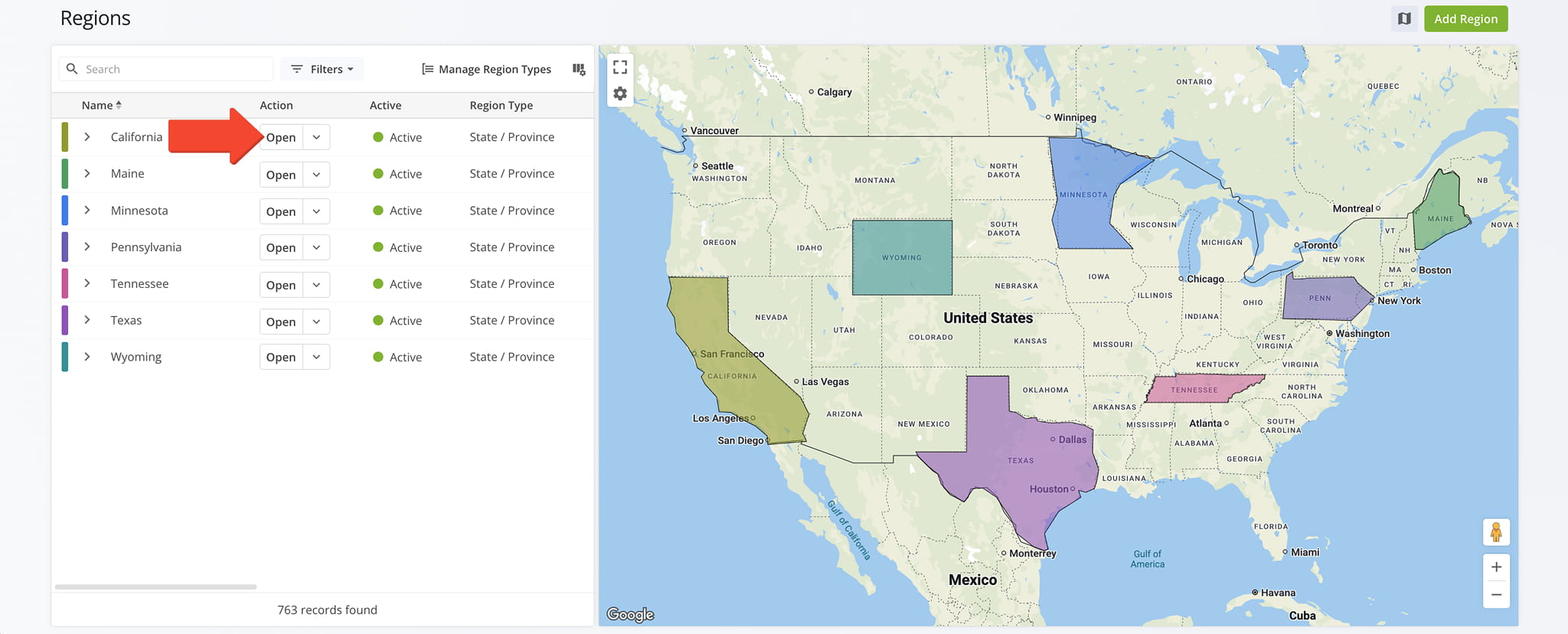
To open your Regions Snapshot, go to “Database” > “Regions” from the Navigation Menu. Then, click “Open” next to a Region to access its Snapshot.
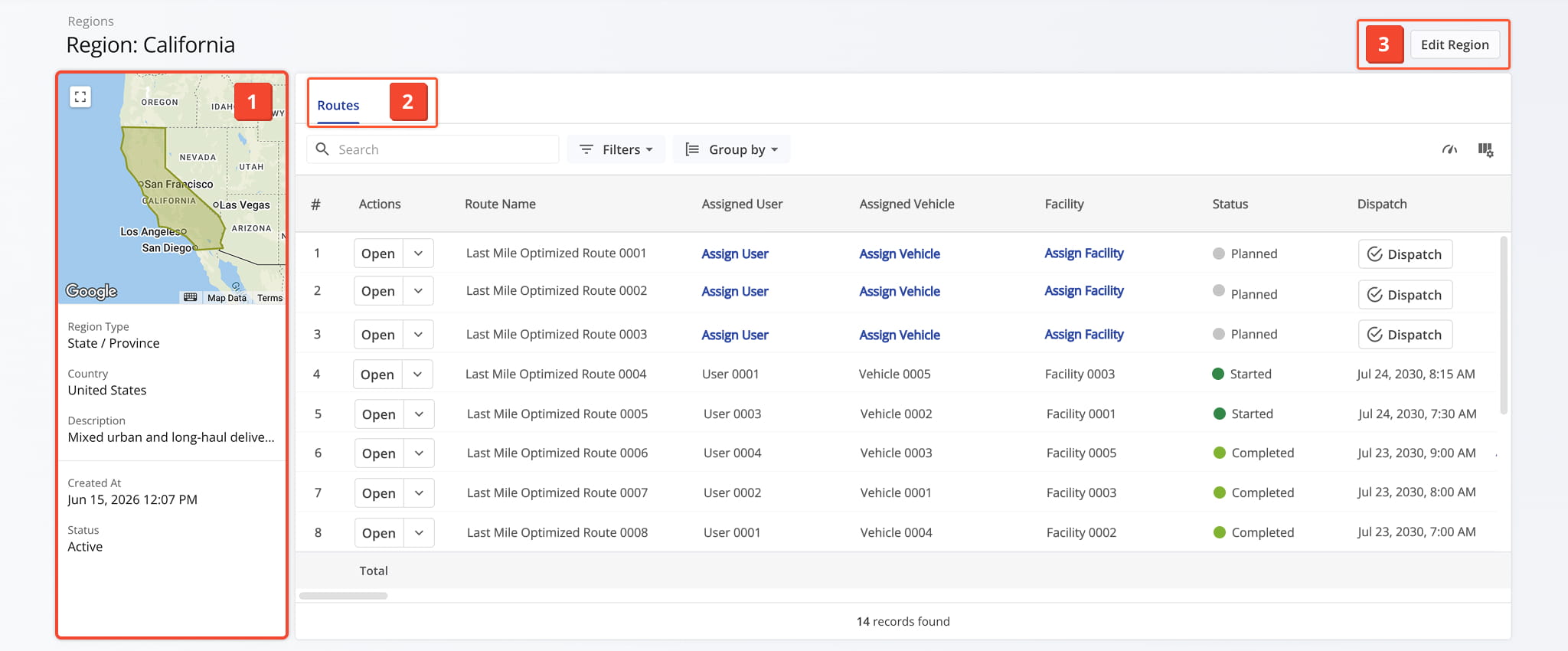
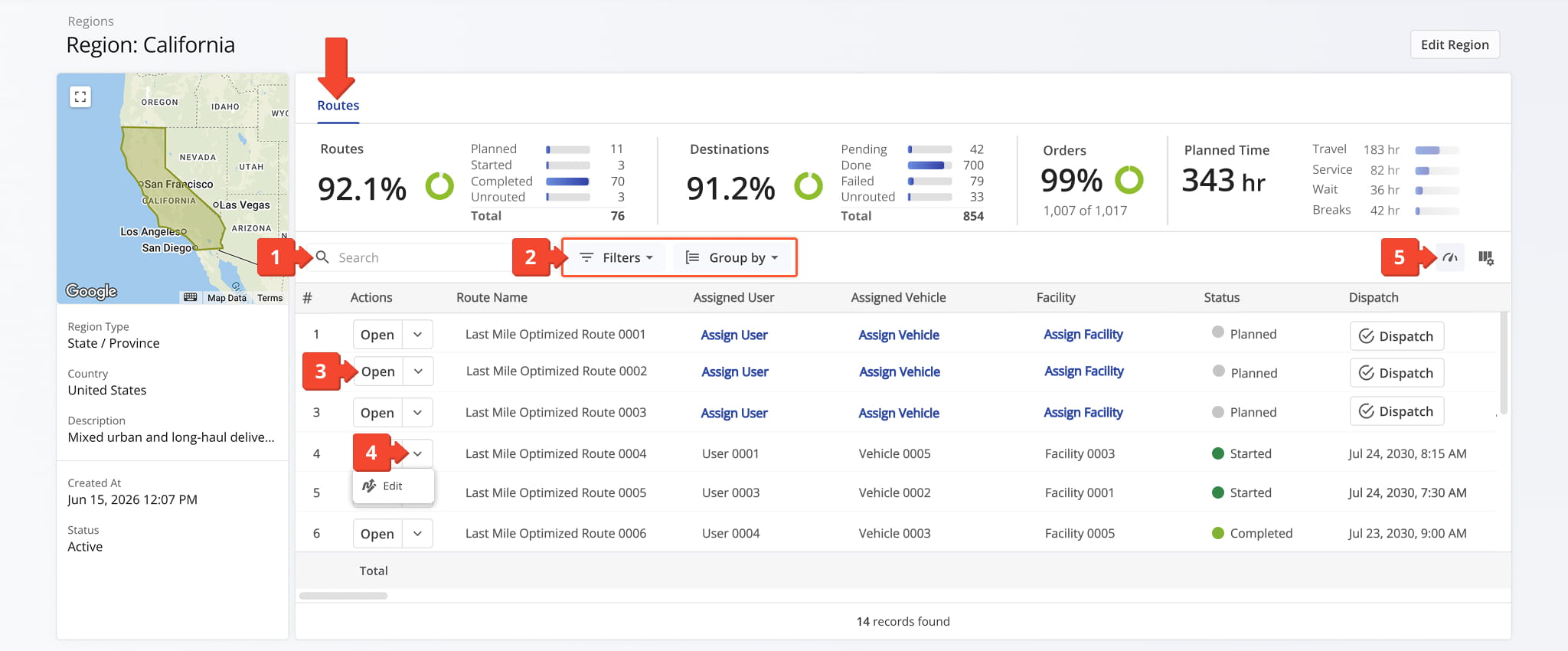
Once you’ve opened the selected Regions Snapshot, you’ll see a detailed interface designed to help you review and manage all Regions data in one place:
- Summary Panel: Overview of key information about the Region.
- Region Data Tab: Explore Region-related data, which you can filter and customize as needed.
- Edit Controls: Click the “Edit Region” button in the top-right corner to modify Region details.
Region Overview – Detailed Snapshot Information Panel
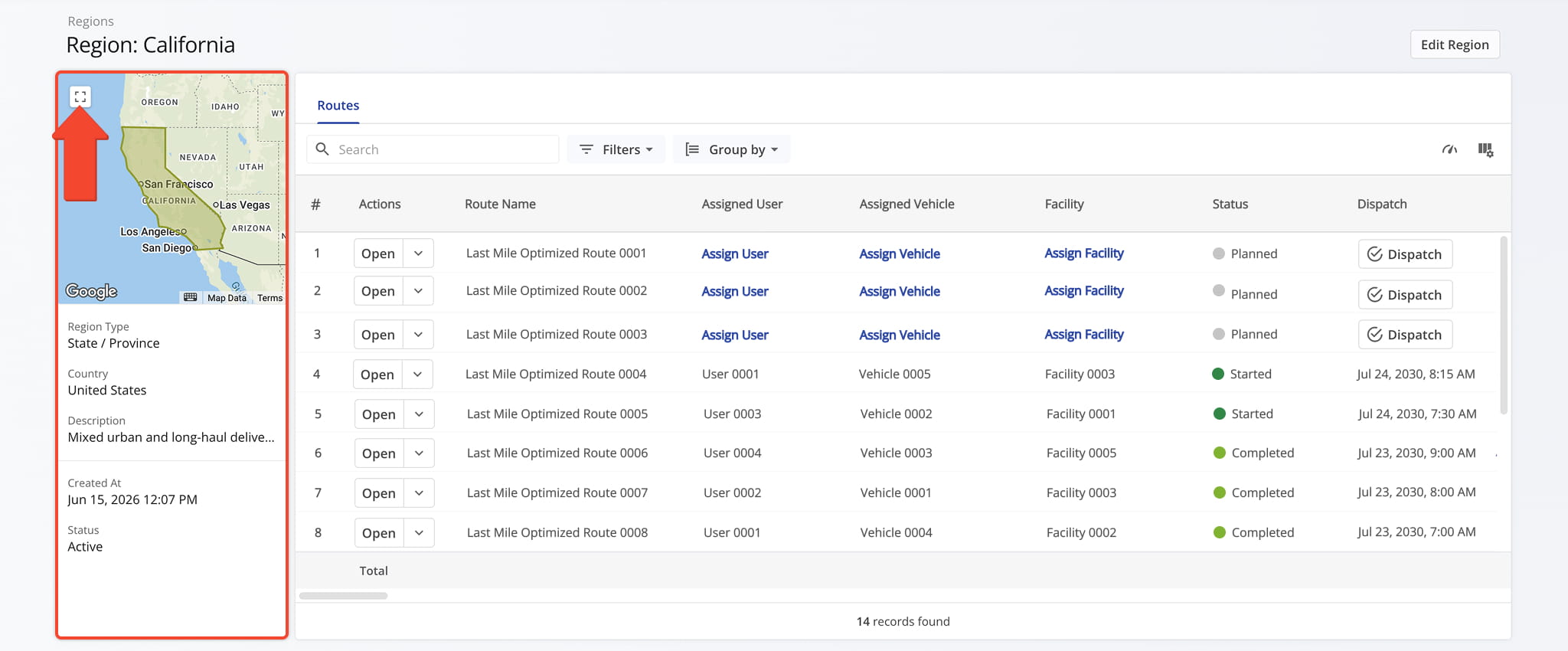
The Region Summary Panel provides an overview of key Region details, including its Region Type, associated country, description, creation date, and active status. You can also view the Region on a map which you can enlarge by clicking the Frame Icon.
Region Snapshot Data – Customizable Contract Data Table
The Routes Tab provides a detailed analytics table of every route associated with the region, giving you real-time performance metrics you can filter and drill into as needed.
From this tab, you can:
- Use the Search field to locate specific routes.
- Apply Filter and Group By options, detailed below, to narrow down which data appears in the table.
- Click “Open” next to a route to access its Routes Snapshot.
- Click the Down Arrow button and select “Edit” to modify the Route in the Route Editor.
- Click the Metrics Icon to view real-time performance insights for your routes.
Regions Snapshot – Regions Tab Filter
The facility or service point associated with the route.
The customer or account associated with the route.
The contract associated with the route, if applicable.
The user assigned to the route.
The vehicle assigned to the route.
The crew or team of drivers/field members assigned to the route.
The name of the Strategic Optimization associated with the route.
Scenario Name
The name of the scenario, within a Strategic Optimization, that generated the route.
Status
The current progress or completion state of the route (e.g., Planned, Scheduled, Started, Completed).
Customer Importance
A ranking or priority level assigned to the customer, which may influence route sequencing or service prioritization.
Planned Total Route Duration (h)
Total planned duration for the route, in hours.
Planned Total Distance (mi)
Total planned distance for the route, in miles.
Custom Data
Custom fields and values added to the route for additional tracking or reference.
Destinations Arrived (Progress %) (User Actioned)
Percentage of planned destinations the driver has arrived at, based on manually confirmed visit data.
Sequence Adherence (%)
Percentage of destinations visited in the same order as originally planned.
Continuous Sequence Adherence (%)
Percentage of consecutive destinations visited in the planned sequence without interruption.
SLA Score
Overall score representing how well the route met its service-level agreement requirements.
Time
A health indicator reflecting the route's time-related performance.
Destinations
A health indicator reflecting the route's destination-related performance.
Distance
A health indicator reflecting the route's distance-related performance.
Destinations Count
Total number of destinations assigned to the route.
Pending Destinations
Number of destinations not yet started or completed by the driver.
Failed Destinations
Number of destinations marked as failed due to inability to complete service.
Skipped Destinations
Number of destinations the driver intentionally skipped or bypassed.
Completed Destinations
Number of destinations successfully completed on the route.
Notes Count
Number of notes added to the route by users or automated processes.
Destinations Arrived Late (User Actioned)
Number of destinations where the driver arrived after the scheduled time window.
Destinations Arrived Early (User Actioned)
Number of destinations where the driver arrived earlier than the scheduled time window.
Destinations Arrived On-Time (User Actioned)
Number of destinations where the driver arrived within the scheduled time window.
Out of Sequence Destinations (#)
Number of destinations that were visited in an order different from the planned sequence.
Actual Total Distance (Mobile App) (mi)
Total distance, in miles, recorded by the mobile app during the route.
Actual Total Distance (Telematics) (mi)
Total distance, in miles, recorded from the assigned vehicle's telematics device.
Pieces Planned
Total number of pieces planned for delivery within the route.
Pieces Completed (%)
Percentage of the planned pieces that have been successfully completed or delivered.
Pieces Completed
Total number of pieces successfully delivered or completed within the route.
Pieces Remaining At End (%)
Percentage of planned pieces that remain incomplete or undelivered at the end of the route.
Weight Planned
Total weight of items planned for delivery on the route.
Weight Completed (%)
Percentage of the planned weight that has been completed during the delivery.
Weight Completed
Total weight of items completed during the delivery on the route.
Weight Remaining At End (%)
Percentage of the planned weight that remains incomplete at the end of the delivery.
Cube Planned
Total cubic volume planned for delivery.
Cube Completed (%)
Percentage of total cubic volume completed for delivery.
Cube Completed
Total cubic volume completed for delivery.
Cube Remaining At End (%)
Percentage of total cubic volume remaining at the end of the route.
Revenue Planned
Planned revenue for the route based on the scheduled deliveries.
Revenue Completed (%)
Percentage of planned revenue that has been completed based on deliveries made.
Revenue Completed
Revenue generated from completed deliveries on the route.
Revenue Remaining At End (%)
Percentage of planned revenue remaining at the end of the route or delivery process.
Cost Planned
Planned cost for completing the route based on the scheduled deliveries.
Cost Completed (%)
Percentage of the planned cost that has been accumulated based on completed activities.
Cost Completed
Cost accumulated from completed deliveries or activities on the route.
Cost Remaining At End (%)
Percentage of the planned cost remaining at the end of the route.
Address Book contact details associated with the route, such as contact alias, address, order details, or customer details.
Scheduled Start Date
Group the data by the route's scheduled start date.
Group the data by the user assigned to the route.
Group the data by the vehicle assigned to the route.
Route Status
Group the data by the route's current status.
Group the data by the customer linked to the route.
Group the data by the contract linked to the route.
Group the data by the facility linked to the route.
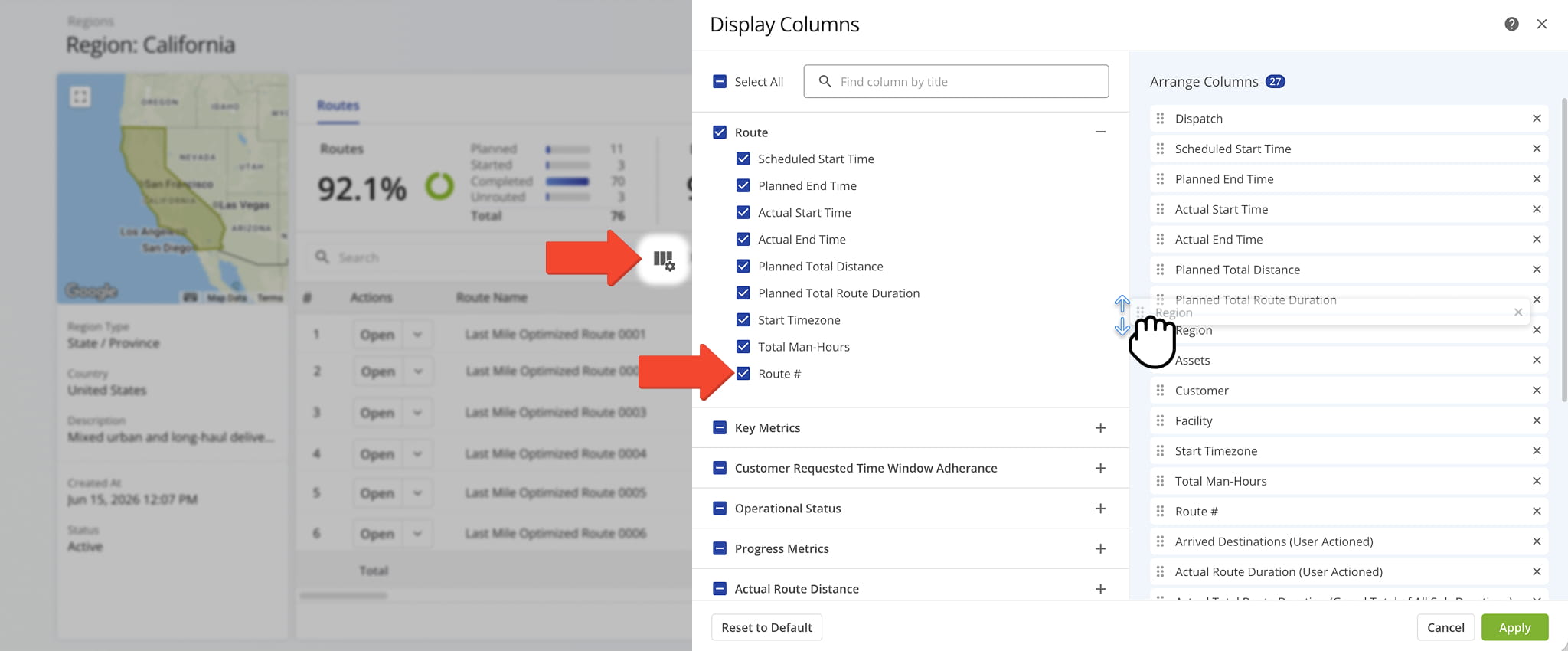
You can also customize the data displayed in the table. Click the Column Icon in the upper right corner to select which route data fields appear and adjust their order to suit your operational needs.
The table below provides an overview of all available data columns, which you can reorder by dragging them into place.
Regions Snapshot – Regions Tab Data Columns
Scheduled Start Time
Scheduled start time for the route.
Planned End Time
Planned end time for the route.
Actual Start Time
Time when the route actually started, reflecting when the driver began the journey.
Actual End Time
Time when the route actually ended, reflecting when the driver completed the route.
Planned Total Distance
Total planned distance for the route, representing the full distance to be traveled during the route.
Planned Total Route Duration
Total planned duration for the route, representing the estimated time required to complete the route.
Start Timezone
The time zone applied to the route's scheduled start time and other time-based route data.
Total Man-Hours
Total labor hours accumulated across all team members assigned to the route.
Route #
The unique identifying number assigned to the route.
Destinations Count
Total number of destinations included on the route.
Pending Destinations
Number of destinations that have not yet been visited or completed on the route.
Failed Destinations
Number of destinations that could not be completed or reached during the route.
Skipped Destinations
Number of destinations that were missed or skipped during the route.
Completed Destinations
Number of destinations that have been completed or successfully visited during the route.
Notes Count
Total number of notes added to the route and its destinations.
Route Start Odometer
The vehicle's odometer reading at the beginning of the route.
Route End Odometer
The vehicle's odometer reading at the end of the route.
Route Start Engine Hours
The vehicle's engine hour meter reading at the beginning of the route.
Route End Engine Hours
The vehicle's engine hour meter reading at the end of the route.
Destinations Arrived On-Time (User Actioned)
Number of destinations where the driver arrived within the customer's requested time window, based on manually confirmed visit data.
Destinations Arrived Early (User Actioned)
Number of destinations where the driver arrived before the customer's requested time window, based on manually confirmed visit data.
Destinations Arrived Late (User Actioned)
Number of destinations where the driver arrived after the customer's requested time window, based on manually confirmed visit data.
First Access Time
Date and time when the route was first opened or accessed by a driver or user.
Status
Current status of the route, indicating its progress or completion stage.
Dispatch
Indicates whether the route has been dispatched to the assigned driver or field team.
Arrived Destinations (User Actioned)
Number of destinations marked as arrived based on manually confirmed visit data.
Destinations Arrived (Progress %) (User Actioned)
Percentage of destinations marked as arrived based on manually confirmed visit data.
Sequence Adherence (%)
Percentage of destinations visited in the same order as originally planned.
Continuous Sequence Adherence (%)
Percentage of consecutive destinations visited in the planned sequence without interruption.
SLA Score (%)
Overall score representing how well the route met its service-level agreement requirements.
Duration Progress (%)
Percentage of the route's planned duration that has elapsed or been completed.
Service Time Progress (%)
Percentage of the route's planned service time that has elapsed or been completed.
Actual Total Distance (Mobile App)
Total distance traveled as recorded by the mobile app during route execution.
Actual Total Distance (Telematics)
Total distance traveled as recorded by the telematics system during route execution.
Actual Total Distance (Merged)
Total distance traveled as recorded by combining data from both the mobile app and the telematics system.
Actual Route Duration (User Actioned)
Total actual duration of the route based on manually confirmed start and end times.
Actual Total Route Duration (Grand Total of All Sub-Durations)
The combined total of all recorded route sub-durations, including travel, service, wait, and break time.
Actual Total Travel Duration (User Actioned)
Total time spent traveling between destinations, based on manually confirmed visit data.
Actual Total Service Duration (User Actioned)
Total time spent providing service at destinations, based on manually confirmed visit data.
Actual Total Wait Duration (User Actioned)
Total time spent waiting at destinations or during stops, based on manually confirmed visit data.
Actual Total Breaks Duration (User Actioned)
Total time spent on driver breaks during the route, based on manually confirmed visit data.
Actual Total Unattributed Duration (User Actioned)
Total time during the route that could not be attributed to travel, service, wait, or break activity.
Actual Total Service Time (Auto Detected)
Total service time spent at each stop, automatically detected based on vehicle or device activity during route execution.
Actual Total Duration (Mobile App)
Total duration of the route, as recorded by the mobile app, including driving and stop times.
Actual Total Duration (Telematics)
Total duration of the route, as recorded by the telematics system, including driving and stop times.
Planned Route Duration
Total planned duration for completing the entire route.
Planned Total Travel Duration
Total planned time allotted for traveling between destinations on the route.
Planned Total Wait Duration
Total planned wait duration for the route, representing the estimated time spent waiting at destinations or during stops.
Planned Total Service Duration
Total planned service time for the route, representing the estimated time spent at each destination for services or deliveries.
Planned Total Break Duration
Total planned driver break duration for the route, representing the estimated time allotted for breaks during the route.
Out of Sequence Destinations (#)
Number of destinations that were visited in an order different from the planned sequence.
Out of Sequence Destinations (%)
Percentage of destinations that were visited in an order different from the planned sequence.
The facility or service point associated with the route.
Vehicles, trailers, or other equipment assigned to the route.
The geographic region associated with the route.
The customer or account associated with the route.
The contract associated with the route, if applicable.
The crew or team of drivers/field members assigned to the route.
The Telematics Connection used to sync tracking and vehicle data for the route.
Pieces Planned
Total number of pieces planned for delivery within the route.
Pieces Completed
Total number of pieces successfully delivered or completed within the route.
Pieces Completed (%)
Percentage of the planned pieces that have been successfully completed or delivered.
Pieces Remaining At End (%)
Percentage of planned pieces that remain incomplete or undelivered at the end of the route.
Weight Planned
Total weight of items planned for delivery on the route.
Weight Completed
Total weight of items completed during the delivery on the route.
Weight Completed (%)
Percentage of the planned weight that has been completed during the delivery.
Weight Remaining At End (%)
Percentage of the planned weight that remains incomplete at the end of the delivery.
Cube Planned
Total cubic volume planned for delivery.
Cube Completed
Total cubic volume completed for delivery.
Cube Completed (%)
Percentage of total cubic volume completed for delivery.
Cube Remaining At End (%)
Percentage of total cubic volume remaining at the end of the route.
Revenue Planned
Planned revenue for the route based on the scheduled deliveries.
Revenue Completed
Revenue generated from completed deliveries on the route.
Revenue Completed (%)
Percentage of planned revenue that has been completed based on deliveries made.
Revenue Remaining At End (%)
Percentage of planned revenue remaining at the end of the route or delivery process.
Cost Planned
Planned cost for completing the route based on the scheduled deliveries.
Cost Completed
Cost accumulated from completed deliveries or activities on the route.
Cost Completed (%)
Percentage of the planned cost that has been accumulated based on completed activities.
Cost Remaining At End (%)
Percentage of the planned cost remaining at the end of the route.
The name of the Strategic Optimization associated with the route.
Scenario Name
The name of the scenario, within a Strategic Optimization, that generated the route.
Custom fields and values added to the route for additional tracking or reference.
Visit Route4Me's Marketplace to Check out Associated Modules:
- Operations
Audit Logging and Activity Stream
- Operations
Custom Data Add-On
- Operations
Advanced Team Management Add-On
Last Updated:


