
Routes Page Data Catalog – Routes List Data Columns And Filters Glossary
The Routes Page provides an overview of all route data, including key metrics, status, and destination information. You can customize route data columns, apply filters to find routes or stops, and use grouping options to organize routes by shared attributes. This centralized view helps you track performance, monitor progress, and optimize operations.
Table of Contents
Routes Page Data Columns
Below is a table of all data columns available on your Routes Page. The columns are organized into categories such as route details, key metrics, and operational status so you can navigate your route data more efficiently.
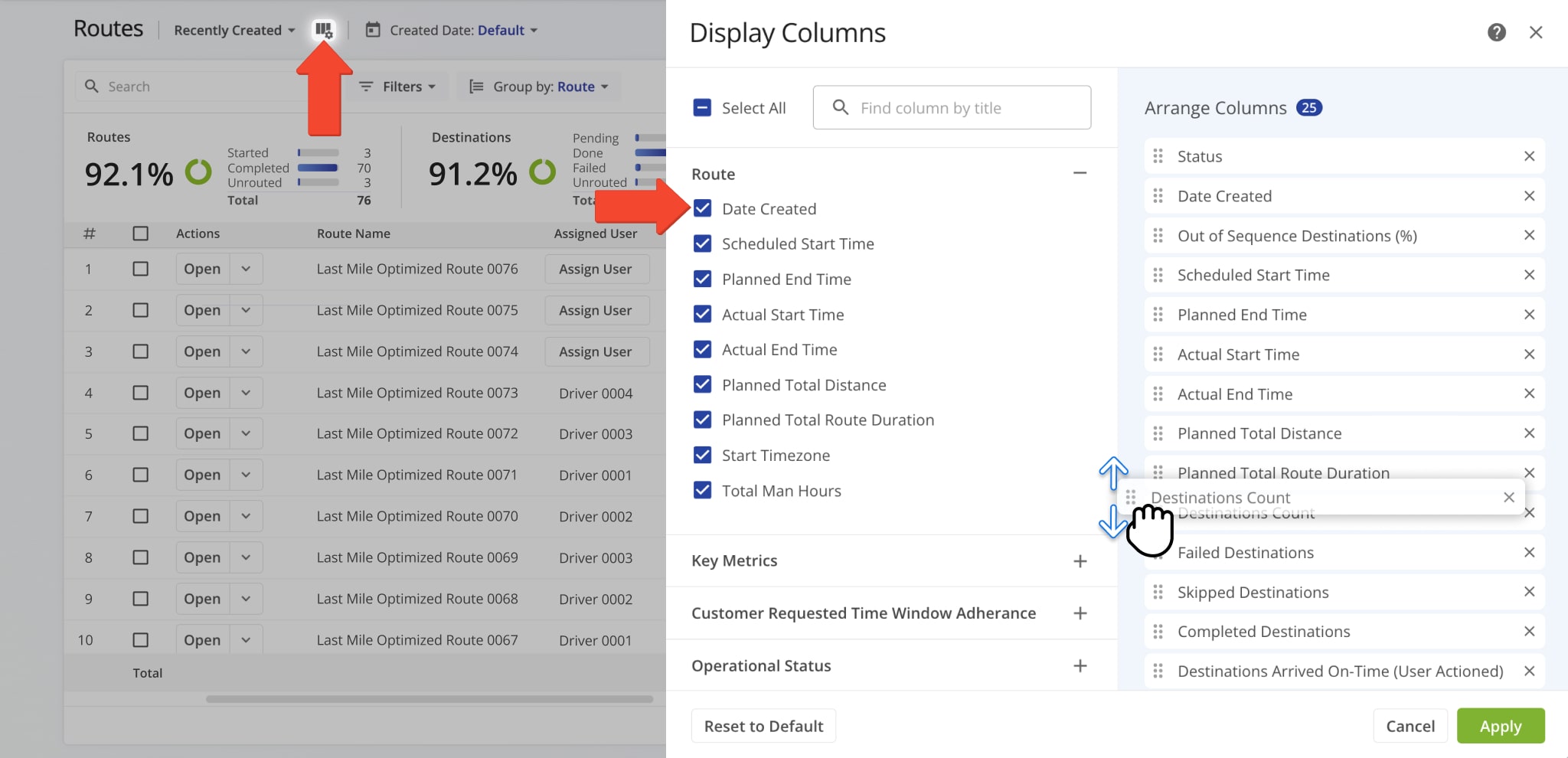
Route Data Columns
2 columns · 70 rows
Date Created
Date and time when the route was created.
Scheduled Start Time
Scheduled start time for the route.
Planned End Time
Planned end time for the route.
Actual Start Time
Time when the route actually started.
Actual End Time
Time when the route was completed.
Planned Total Distance
Total distance planned for the route, including all stops.
Planned Total Route Duration
Estimated total duration for completing the route.
Start Timezone
Timezone of the route’s start location.
Destinations Count
Total number of destinations planned for the route.
Pending Destinations
Number of destinations not yet visited.
Failed Destinations
Number of destinations that could not be completed.
Skipped Destinations
Number of destinations intentionally skipped.
Completed Destinations
Number of destinations successfully completed.
Route Start Engine Hours
Engine hour meter reading recorded at the beginning of the route, used as a baseline for tracking engine usage.
Route End Engine Hours
Engine hour meter reading recorded at the completion of the route, used to calculate total engine hours consumed during the route.
Destinations Arrived On-Time (User Actioned)
Destinations where arrival matched the scheduled time, based on user input.
Destinations Arrived Early (User Actioned)
Destinations reached earlier than scheduled, based on user input.
Destinations Arrived Late (User Actioned)
Destinations reached later than scheduled, based on user input.
First Access Time
Date and time the route was first viewed by a user.
Status
Current progress or completion status of the route.
Dispatch
Indicates whether the route has been assigned to a driver or team.
Arrived Destinations (User Actioned)
Number of destinations marked as arrived by user actions.
Destinations Arrived (Progress %) (User Actioned)
Percentage of destinations completed, based on user input.
Sequence Adherence (#)
The number of stops visited in the exact order planned in the optimized route. This metric shows how closely the driver followed the prescribed stop sequence.
Continuous Sequence Adherence (#)
The number of consecutive stops visited in the correct order without any deviations. This highlights uninterrupted adherence to the planned route sequence, helping identify where deviations occurred.
Actual Total Distance (Mobile App)
Total distance traveled, recorded by the mobile app.
Actual Total Distance (Telematics)
Total distance traveled, recorded by telematics.
Actual Total Distance (Merged)
Combined distance from mobile app and telematics data.
Actual Route Duration (User Actioned)
Total route duration as recorded based on user actions.
Actual Total Route Duration (Grand total of all route sub-durations)
Total duration of the route, combining all individual sub-durations for driving, service, wait, and breaks.
Actual Total Travel Duration (User Actioned)
Total driving time recorded by user actions.
Actual Total Service Duration (User Actioned)
Total service time at destinations recorded by user actions.
Actual Total Wait Duration (User Actioned)
Total wait time recorded during the route.
Actual Total Breaks Duration (User Actioned)
Total break time taken by drivers during the route.
Actual Total Unattributed Duration (User Actioned)
Time not attributed to driving, service, or breaks.
Actual Total Service Time (Auto Detected)
Service time automatically recorded by system.
Actual Total Duration (Mobile App)
Total duration of route recorded via the mobile app.
Actual Total Duration (Telematics)
Total duration of route recorded via telematics.
Planned Route Duration
Estimated total route duration.
Planned Total Travel Duration
Estimated driving time for the route.
Planned Total Wait Duration
Estimated total wait time during the route.
Planned Total Service Duration
Estimated total service time at destinations.
Planned Total Break Duration
Estimated total driver break time.
Out of Sequence Destinations (#)
Number of destinations visited out of planned order.
Out of Sequence Destinations (%)
Percentage of destinations visited out of order.
Facility
Location or service point assigned to the route.
Assets
Physical equipment, such as containers, trailers, or vehicles, tracked and managed within your Route4Me account.
Region
A defined territory within a structured geographic hierarchy, used to organize coverage areas for route planning and resource assignment.
Customer
Customer assigned to the route.
Contract
Contract associated with the route.
Crew
The group of users assigned to execute the route.
Telematics Connection
The telematics integration linked to the route for collecting GPS and vehicle tracking data.
Pieces Planned
Total number of pieces planned for delivery.
Pieces Completed
Number of pieces successfully delivered.
Pieces Completed (%)
Percentage of planned pieces delivered.
Pieces Remaining At End (%)
Percentage of pieces undelivered at the route’s end.
Weight Planned
Total weight of items planned for delivery.
Weight Completed
Weight of items successfully delivered.
Weight Completed (%)
Percentage of planned weight delivered.
Weight Remaining At End (%)
Percentage of weight remaining at the end of the route.
Cube Planned
Total cubic volume planned for delivery.
Cube Completed
Cubic volume successfully delivered.
Cube Completed (%)
Percentage of planned cubic volume delivered.
Cube Remaining At End (%)
Percentage of cubic volume remaining at the end of the route.
Revenue Planned
Planned revenue for the route based on scheduled deliveries.
Revenue Completed
Revenue earned from completed deliveries.
Revenue Completed (%)
Percentage of planned revenue achieved.
Revenue Remaining At End (%)
Percentage of planned revenue remaining at the route’s end.
Strategic Optimization Name
Name of the strategic optimization applied to the route.
Scenario Name
Scenario associated with the strategic optimization.
Routes Page Filters
Filters allow you to narrow and sort routes by various attributes, making it easier to review route details, compare results, and manage operations across your team. Below is an overview of all available Routes Page filters.
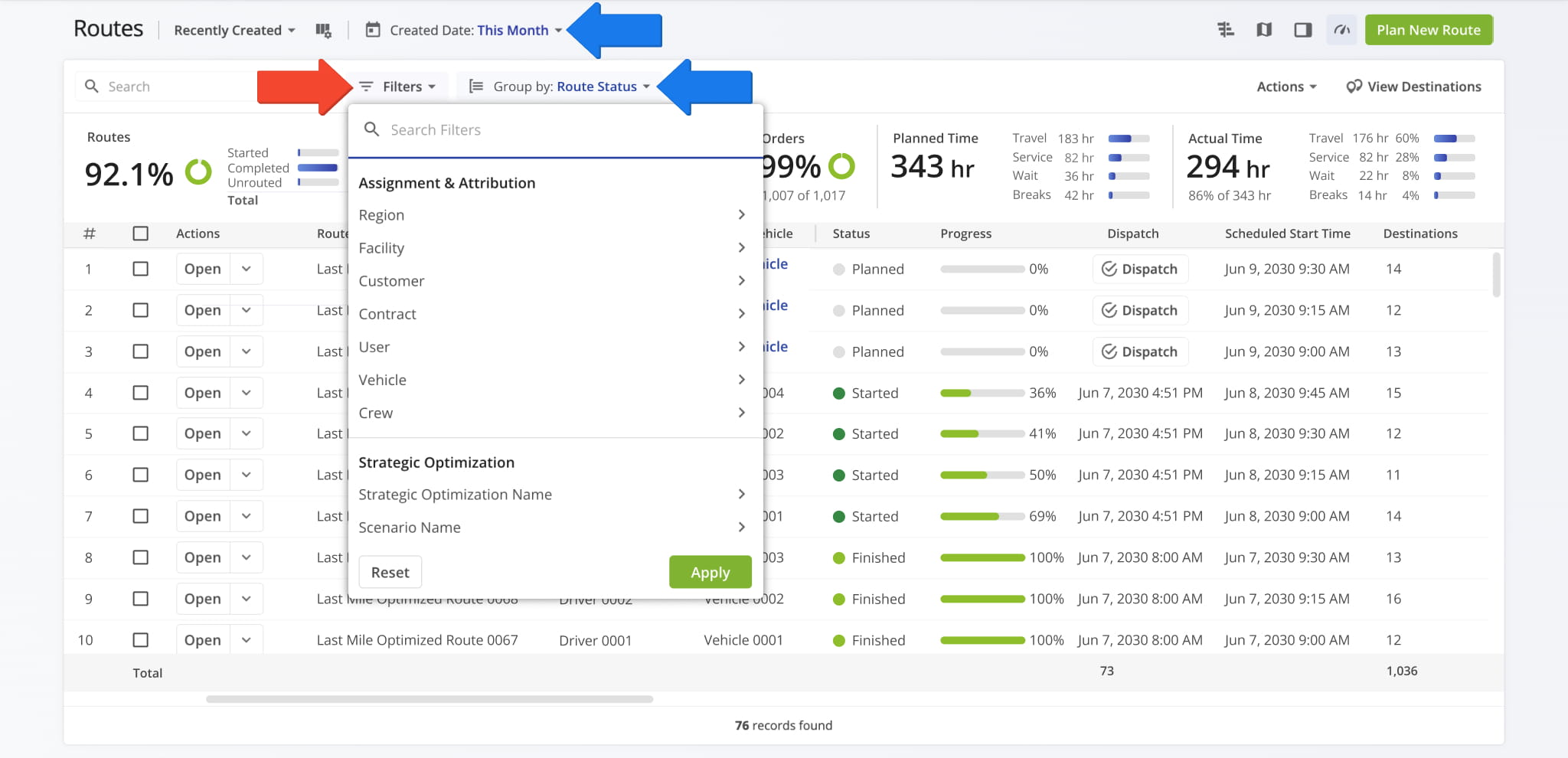
Route Filters
2 columns · 52 rows
Region
Filter by region assigned to the route. You can also check the Unassigned box to view routes that haven't been assigned to a region.
Facility
Filter by facility assigned to the route. You can also check the Unassigned box to view routes that haven't been assigned to a facility.
User
Filter by user assigned to the route.
Vehicle
Filter by vehicle assigned to the route. You can also check the Unassigned box to view routes that haven't been assigned to a vehicle.
Customer
Filter by customer linked to the route. You can also check the Unassigned box to view routes that haven't been linked to a customer.
Contract
Filter by contract linked to the route. You can also check the Unassigned box to view routes that haven't been linked to a contract.
Crew
Filter by crew assigned to the route. You can also check the Unassigned box to view routes that haven't been assigned to a crew.
Strategic Optimization Name
Filter by the name of the strategic optimization used to generate or modify the route.
Scenario Name
Filter by the scenario applied during strategic route planning.
Status
Filter by the current progress or completion state of the route (e.g., Planned, Scheduled, Started, Completed).
Has Telematics Incident
Filter routes by whether one or more Telematics Incidents were recorded during the route. Select Yes to show routes with at least one recorded incident, No to show routes with none.
Customer Importance
Filter by the assigned level of importance given to a customer: high, medium, or low. You can also check the Unassigned box to view customers that haven't been assigned a level of importance.
Planned Total Route Duration (h)
Filter by the total estimated duration, in hours, planned for completing the route.
Planned Total Distance (mi)
Filter by the total planned distance, in miles, for completing all stops on the route.
Custom Data
Filter by custom data fields and values associated with the route.
Destinations Arrived (Progress %) (User Actioned)
Filter by the percentage of planned destinations the driver has arrived at.
Sequence Adherence (%)
Filter by the percentage of planned stops visited in the exact route sequence order.
Continuous Sequence Adherence (%)
Filter by the percentage of consecutively visited stops that follow the planned route sequence.
SLA Score
Filters routes by their overall SLA status - Critical, At Risk, Healthy, or Not Started - based on a combined evaluation of time, destinations, and distance.
Time
Filters routes by SLA status based on how much scheduled time has elapsed or remains - Critical, At Risk, Healthy, or Not Started.
Destinations
Filters routes by SLA status based on the number or percentage of destinations completed - Critical, At Risk, Healthy, or Not Started.
Distance
Filters routes by SLA status based on the distance traveled relative to the planned route - Critical, At Risk, Healthy, or Not Started.
Destinations Count
Filter by the total number of destinations assigned to the route.
Pending Destinations
Filter by destinations not yet started or completed by the driver.
Failed Destinations
Filter by destinations marked as failed due to inability to complete service.
Skipped Destinations
Filter by destinations the driver intentionally skipped or bypassed.
Completed Destinations
Filter by destinations successfully completed on the route.
Destinations Arrived Late (User Actioned)
Filter by destinations where the driver arrived after the scheduled time window.
Destinations Arrived Early (User Actioned)
Filter by destinations where the driver arrived earlier than the scheduled time window.
Destinations Arrived On Time (User Actioned)
Filter by destinations where the driver arrived within the scheduled time window.
Out of Sequence Destinations (#)
The number of destinations visited in an order different from the planned sequence.
Actual Total Distance (Mobile App) (mi)
Total distance in miles recorded by the mobile app during the route.
Actual Total Distance (Telematics)
Total distance in miles recorded from the assigned vehicle’s telematics device.
Has Incidents
Filter routes by whether one or more safety incidents were recorded during the route. Select "Yes" to show routes with at least one recorded incident, or "No" to show routes with none.
Total Incidents
Filter routes by a minimum and/or maximum number of recorded safety incidents.
Incident Type
Filter routes by specific incident type, such as Harsh Braking, Harsh Acceleration, Collision, Unsafe Parking, and more.
Planned
Filter by total planned Pieces (units) amount of all Destinations on the planned route.
Completed
Filter by total number of completed pieces or units.
Completed (%)
Filter by percentage of pieces or units completed.
Remaining At End (%)
Filter by percentage of pieces or units still remaining when the route ended.
Planned
Filter by total planned Weight amount of all Destinations on the planned route.
Completed
Filter by total weight completed across all serviced destinations.
Completed (%)
Filter by percentage of planned weight completed.
Remaining At End (%)
Filter by percentage of planned weight still remaining at the route’s end.
Planned
Filter by total planned Cube (volume) amount of all Destinations on the planned route.
Completed
Filter by total cubic volume completed across all serviced destinations.
Completed (%)
Filter by percentage of the planned volume completed.
Remaining At End (%)
Filter by percentage of planned volume remaining at the route’s end.
Planned
Filter by total revenue to be generated from servicing all route Destinations.
Completed
Filter by total revenue generated from the Destinations completed on the route.
Completed (%)
Filter by percentage of planned revenue achieved.
Remaining At End (%)
Filter by percentage of revenue still unfulfilled at route end.
Routes Page Grouping Options
Grouping routes sorts the Routes Page by shared attributes, making it easier to review large numbers of routes, compare results, and manage operations at scale from a single view. Below is an overview of all Routes Page grouping options.
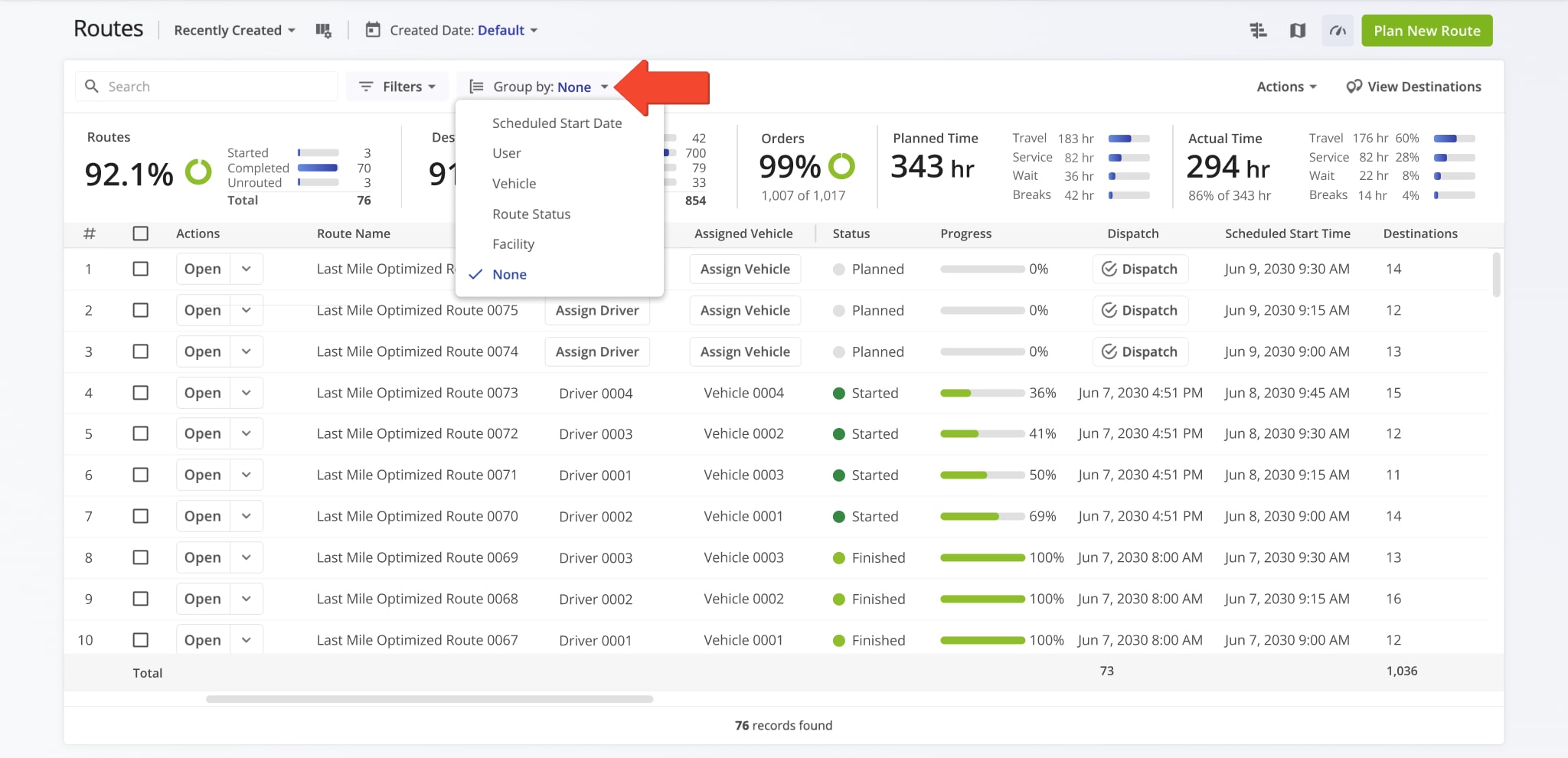
Route Grouping Options
2 columns · 7 rows
Scheduled Start Date
Group routes based on their scheduled start date.
User
Group routes by user assigned to the route.
Vehicle
Group routes by vehicle assigned to the route.
Route Status
Group routes by their current progress or completion state (e.g., Planned, Scheduled, Started, Completed).
Facility
Group routes by facility linked to the route.
Optimization
Group routes by their assigned Optimization Profile.
None
Remove grouping so that all routes are displayed individually.
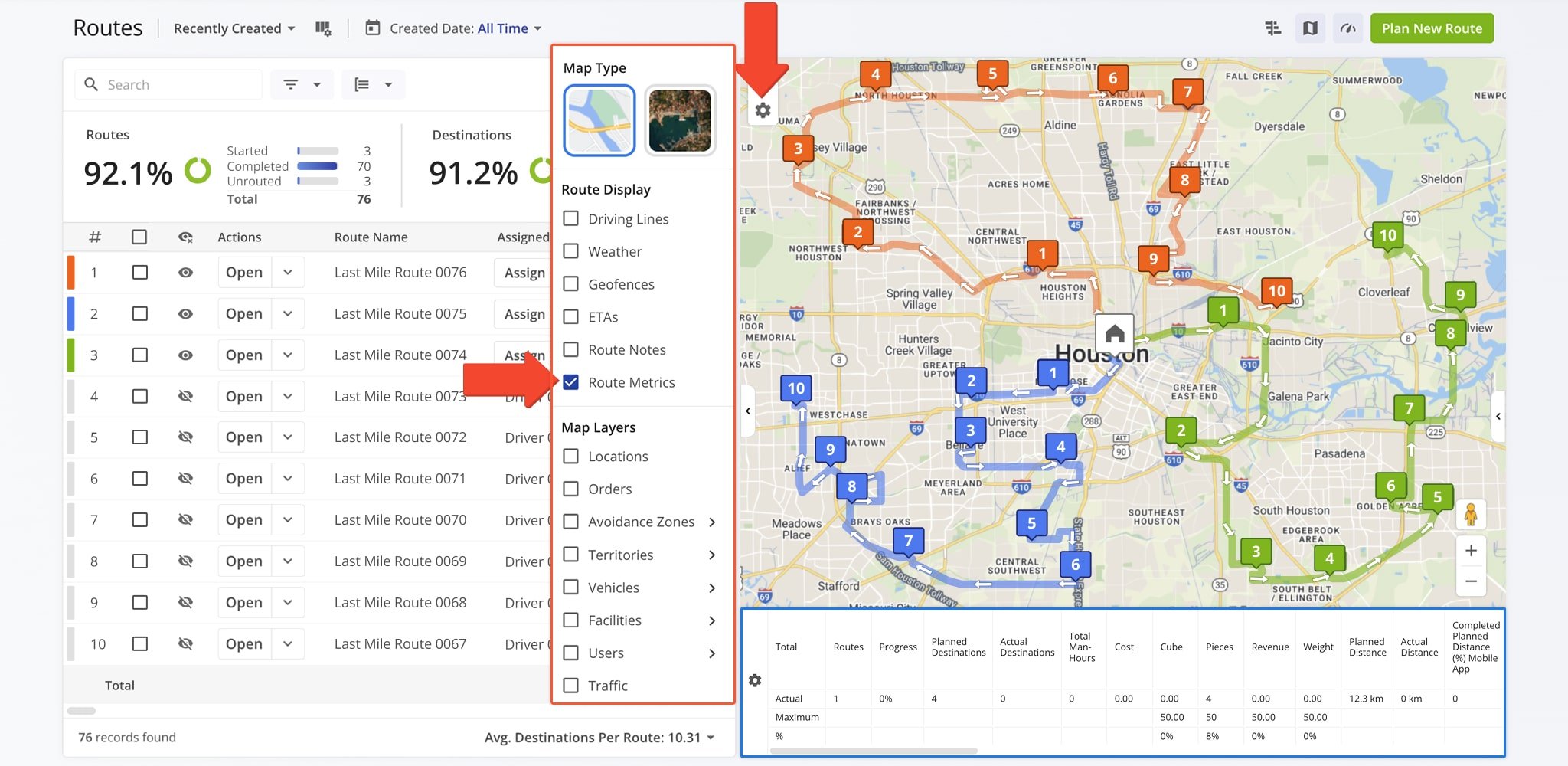
Routes Map – Route Metrics Display
Routes Map metrics provide a high-level overview of route performance, workload, and efficiency across selected routes. These metrics help you quickly evaluate progress, distance, time, and utilization without opening individual route details.
Below is an overview of all available Routes Map metrics.
Routes Map Metrics
2 columns · 45 rows
Routes
The total number of routes included in the selected view.
Progress
The percentage of destinations completed across all selected routes.
Planned Destinations
The total number of destinations scheduled for the selected routes according to the original route plans.
Actual Destinations
The total number of destinations that were actually visited or completed during route execution.
Total Man-Hours
The combined time spent by all drivers or users on the selected routes, including travel and service time.
Cost
The total cost associated with completing the selected routes.
Cube
The total volume of goods to be delivered across the selected routes, measured in cubic units.
Pieces
The total number of individual items to be delivered across all stops on the selected routes.
Revenue
The total revenue associated with deliveries or services completed on the selected routes.
Weight
The total weight of goods to be delivered across all selected routes.
Planned Distance
The total distance planned for the selected routes based on their original route plans.
Actual Distance
The total distance actually traveled on the selected routes.
Completed Planned Distance (%) Mobile App
The percentage of planned distance completed, as tracked via the Mobile App.
Completed Planned Distance (%) Telematics
The percentage of planned distance completed, as tracked via telematics systems.
Completed Planned Distance (%) Mobile App + Telematics
The combined percentage of planned distance completed using Mobile App and telematics data.
Remaining Planned Distance (%) Mobile App
The percentage of planned distance remaining, as tracked via the Mobile App.
Remaining Planned Distance (%) Telematics
The percentage of planned distance remaining, as tracked via telematics systems.
Remaining Planned Distance (%) Mobile App + Telematics
The combined percentage of remaining planned distance using Mobile App and telematics data.
Deviated From Planned Distance (%) Mobile App
The percentage of distance traveled that deviated from the planned route, as tracked via the Mobile App.
Deviated From Planned Distance (%) Telematics
The percentage of distance traveled that deviated from the planned route, as tracked via telematics.
Deviated From Planned Distance (%) Mobile App + Telematics
The combined deviation from planned distance using Mobile App and telematics data.
Planned Total Duration
The total planned time required to complete the selected routes.
Actual Total Duration
The total actual time taken to complete the selected routes.
Planned Travel Duration
The amount of time planned for driving between destinations.
Actual Travel Duration
The amount of time actually spent driving between destinations.
Planned Service Duration
The amount of time planned for completing service at destinations.
Unattributed Duration
Time spent on the route that is not categorized as travel or service.
Actual Service Duration
The amount of time actually spent servicing destinations.
Time in Traffic
Time spent delayed due to traffic conditions.
Planned Wait Duration
The amount of time planned for waiting at destinations or between stops.
Actual Wait Duration
The amount of time actually spent waiting at destinations or between stops.
Stem In
Distance or time from the route start location to the first stop.
Stem Out
Distance or time from the last stop to the route end location.
Planned Break Duration
The amount of time planned for breaks.
Actual Break Duration
The amount of time actually taken for breaks.
Destinations / Distance Density
The number of destinations per unit of distance, indicating stop density along the route.
Destinations / Hour Density
The number of destinations visited per hour, showing operational efficiency.
Transactions / Hour Density
The number of transactions completed per hour, measuring delivery or service speed.
SPORH
Stops per operational route hour, showing efficiency relative to active route time.
TPORH
Total points or destinations per operational route hour.
Cubic / Destinations Density
The volume of goods per destination, indicating delivery size per stop.
Cubic / Distance Density
The volume of goods delivered per unit of distance traveled.
Pieces / Distance Density
The number of items delivered per unit of distance traveled.
Weight / Distance Density
The weight of goods delivered per unit of distance traveled.
Weight / Destinations Density
The average weight of goods delivered per destination.
Visit Route4Me's Marketplace to Check out Associated Modules:
- Operations
Audit Logging and Activity Stream
- Operations
Custom Data Add-On
- Operations
Advanced Team Management Add-On
About author: Daniel Archer

