
Delete Routes On Mobile – Remove Routes From Route Planner App
Route4Me’s Route Planner App makes it easy to remove routes you no longer need, keeping your Routes List clean and organized. Deleting a route permanently removes its destinations and related data, so it’s best reserved for routes you’re certain you won’t need again. Learn more in this guide.
Delete A Route From The Routes List
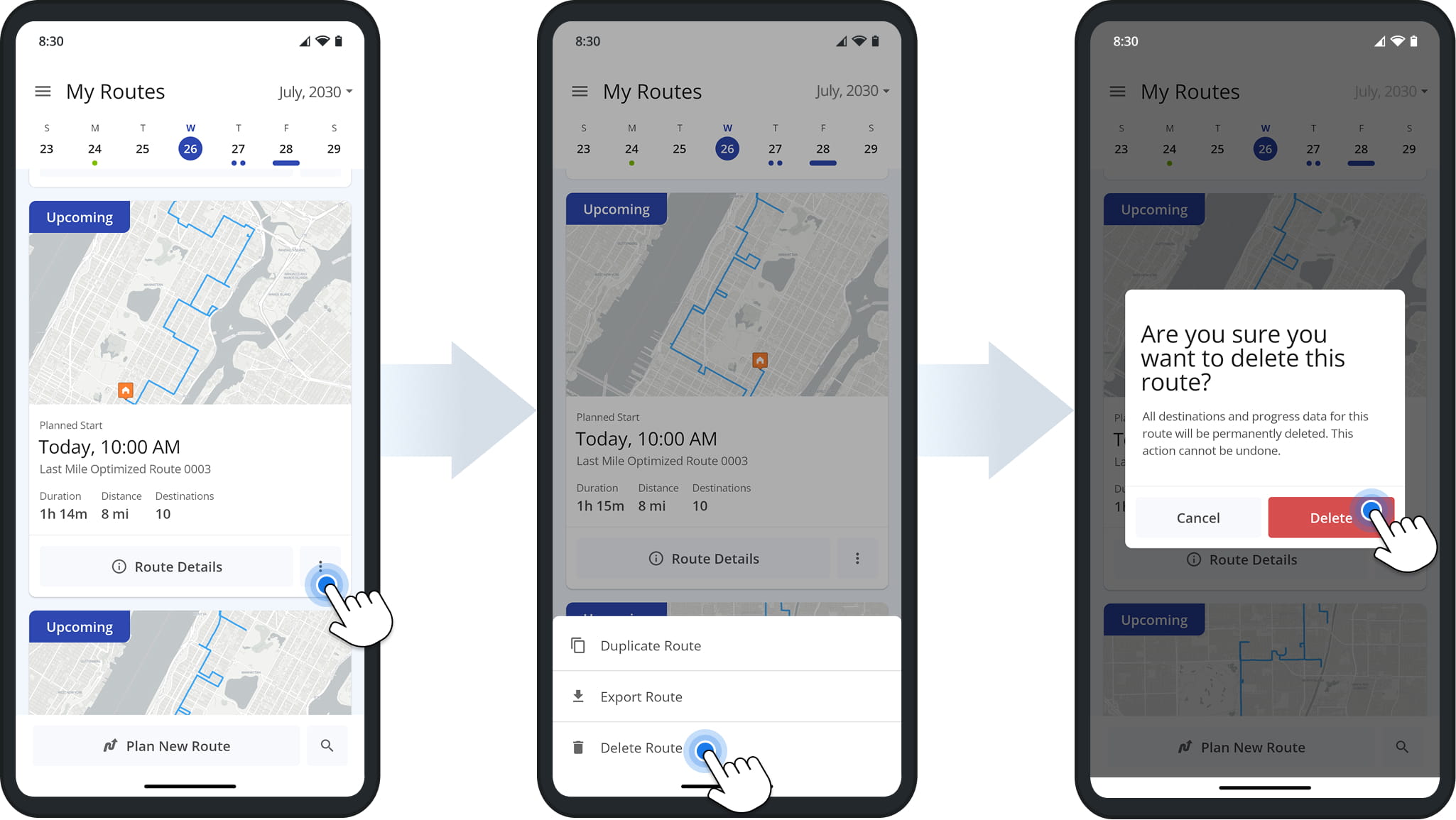
To delete a route, locate it in your Routes List, tap the 3-Dot Button next to the route, and select “Delete Route” from the pop up action menu. You’ll then be prompted to confirm the deletion.
Once confirmed, the route is immediately removed from your Routes List. NOTE: All destinations and related data are permanently deleted and cannot be retrieved.
Visit Route4Me's Marketplace to Check out Associated Modules:
- Route Optimization
Mixed Vehicles Routing
- Route Optimization
Route Optimization for Multiple Drivers Without Advanced Constraints
- Route Optimization
Commercial Vehicle Route Planning
About author: Daniel Archer

