
Operational Assessment Guide – Optimization4Me Fleet Analysis & Insights
Route4Me’s Operational Assessment platform, Optimization4Me, helps enterprise businesses and partners optimize fleet and last mile operations using real telematics data. The platform analyzes vehicles, routes, drivers, and operational activity to identify inefficiencies and savings opportunities at scale. It compares current performance against optimized scenarios to deliver actionable insights through centralized dashboards, analytics, and reporting.
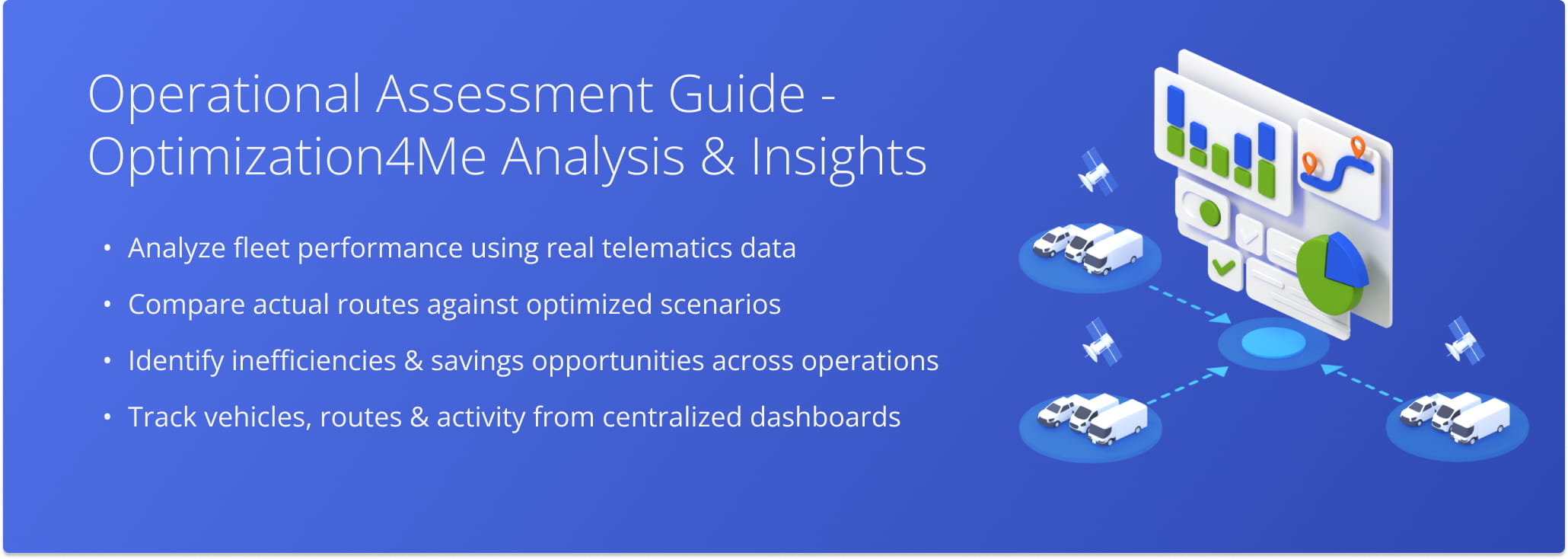
Table of Contents
Scaling Fleet Optimization With Operational Assessment
Managing large-scale fleet operations across thousands of routes makes it difficult to consistently evaluate performance and identify inefficiencies. Traditional fleet optimization often relies on manual analysis and fragmented data across multiple systems.
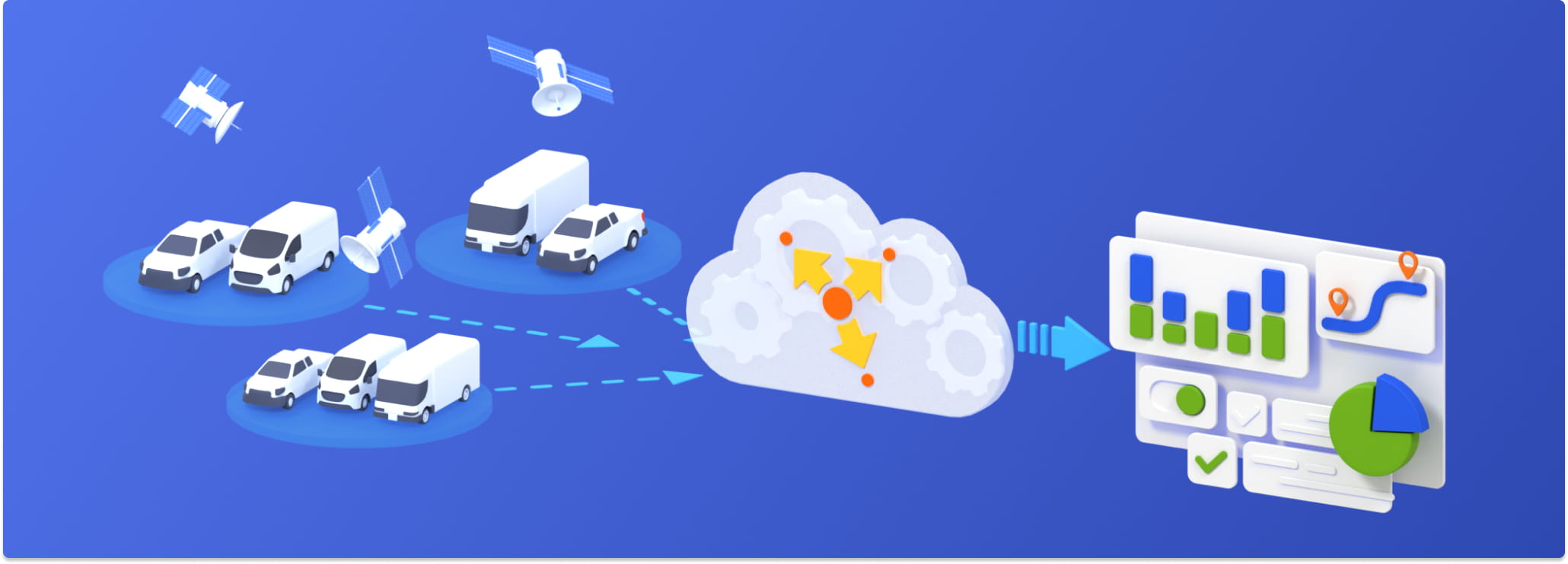
Optimization4Me Operational Assessment centralizes telematics data and enables enterprise-wide visibility into fleet and route performance. It helps organizations move from manual analysis to structured, scalable insights across their operations.
Key Benefits Of Scaling Fleet Optimization With Operational Assessment:
- Analyze fleet performance across vehicles, routes, and drivers in a centralized platform.
- Identify routing inefficiencies and savings opportunities using telematics data.
- Compare at scale current operations against optimized routing scenarios.
- Reduce manual effort for route analysis, optimization, and reporting.
- Support enterprise decision-making with centralized dashboards and analytics.
Optimization4Me Fleet Management And System Features
Operational Assessment Ecosystem – Affiliates, Participants, Data Connections
The Operational Assessment system is structured around Affiliates, Participants, and telematics data connections that work together to analyze fleet performance at scale:
- Affiliate: A Route4Me partner that manages the Operational Assessment setup and uses the platform to demonstrate fleet optimization value to customers.
- Participant: A customer organization that provides real fleet and routing data from daily operations for analysis within the system.
- Telematics Connection: A data link that connects each Participant’s fleet data to their telematics provider and imports it into Operational Assessment for analysis and optimization.
Affiliate Dashboard – Fleet Performance And Participant Insights
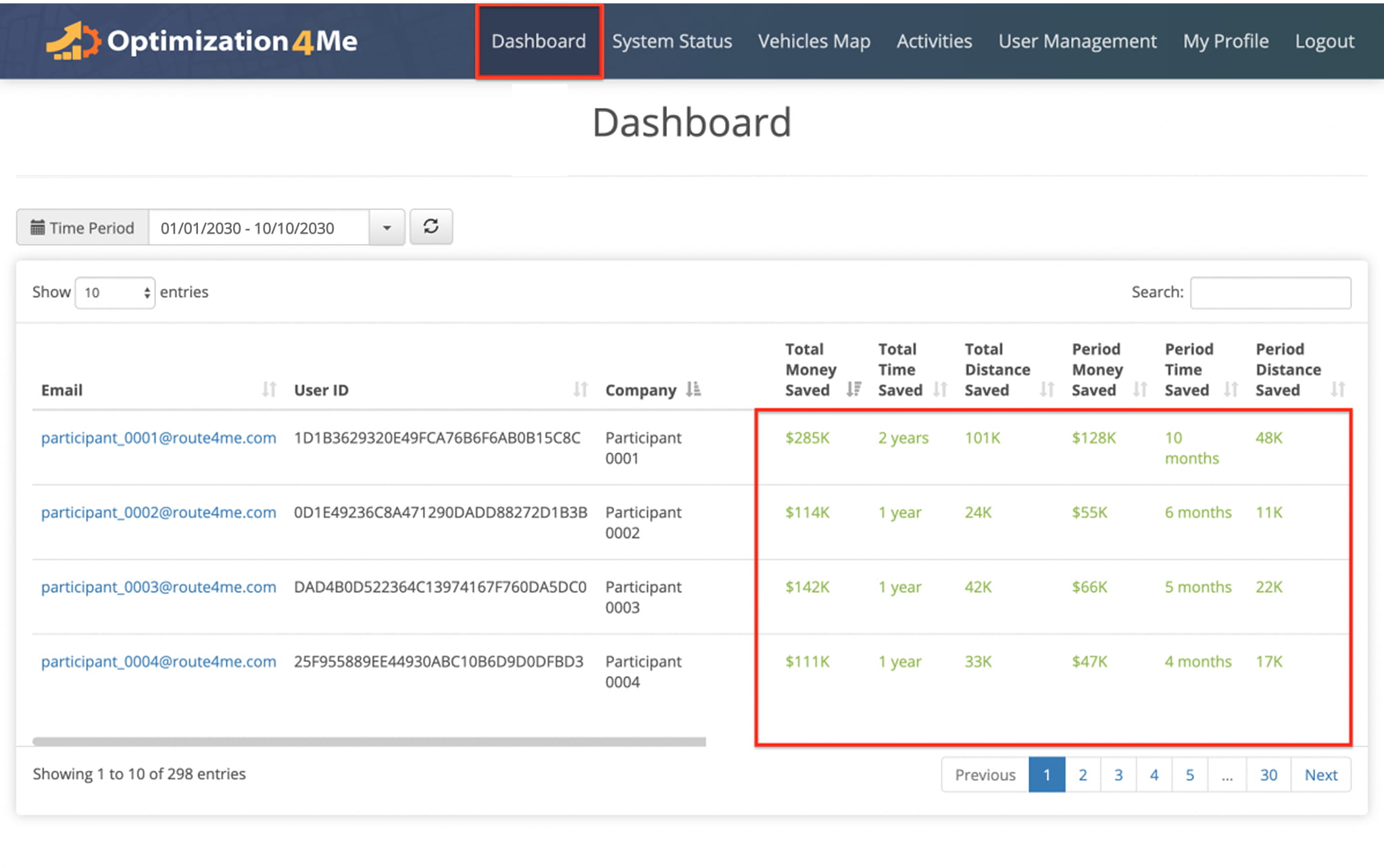
The platform’s Affiliate Dashboard provides centralized visibility into fleet performance and all Participants associated with an Affiliate account. It aggregates telematics data, routing activity, and operational metrics into a single interface:
- Participant Summaries: Overview of operational performance and activity for each connected Participant.
- Operational Assessment Reports: Access to detailed fleet performance and optimization insights generated from telematics data.
- System Status and Activity Data: Real-time visibility into data processing, system updates, and operational activity across connected accounts.
Estimated Savings Report – Fleet Efficiency And Optimization Gains
The Estimated Savings Report compares Actual (Baseline) fleet activity against optimized routing scenarios to identify potential reductions in mileage, travel time, and operational costs.
The report uses Actual (Baseline), As-Is, and Optimized data sets to enable route-level analysis:
- Actual (Baseline) data represents raw telematics tracking information imported through the Telematics Connection.
- As-Is data reflects existing operational conditions after route detection and operational analysis.
- Optimized data shows projected performance improvements generated through route optimization scenarios.
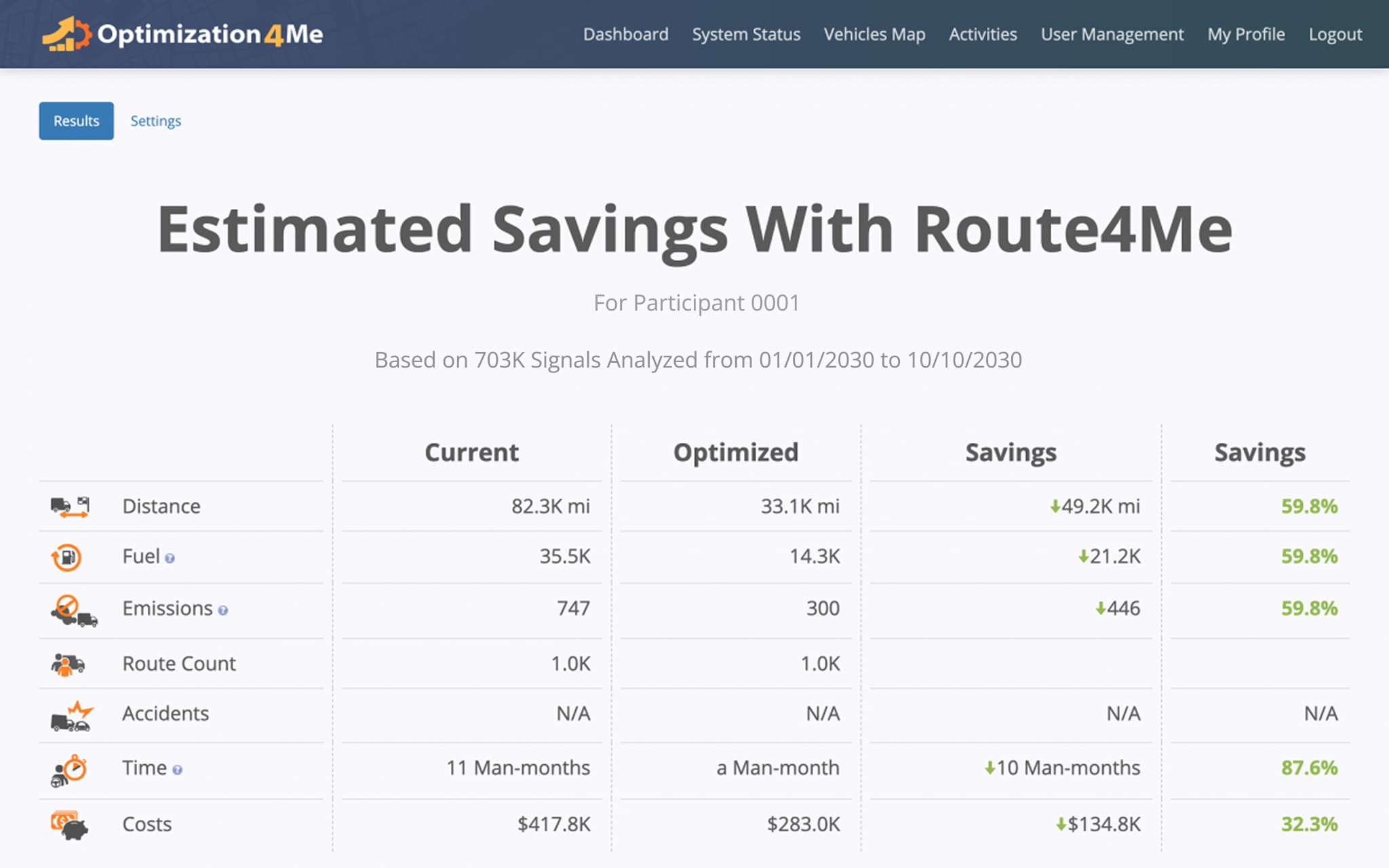
Users can filter results by date range, vehicles, or routes and review savings breakdowns across specific segments of fleet activity.
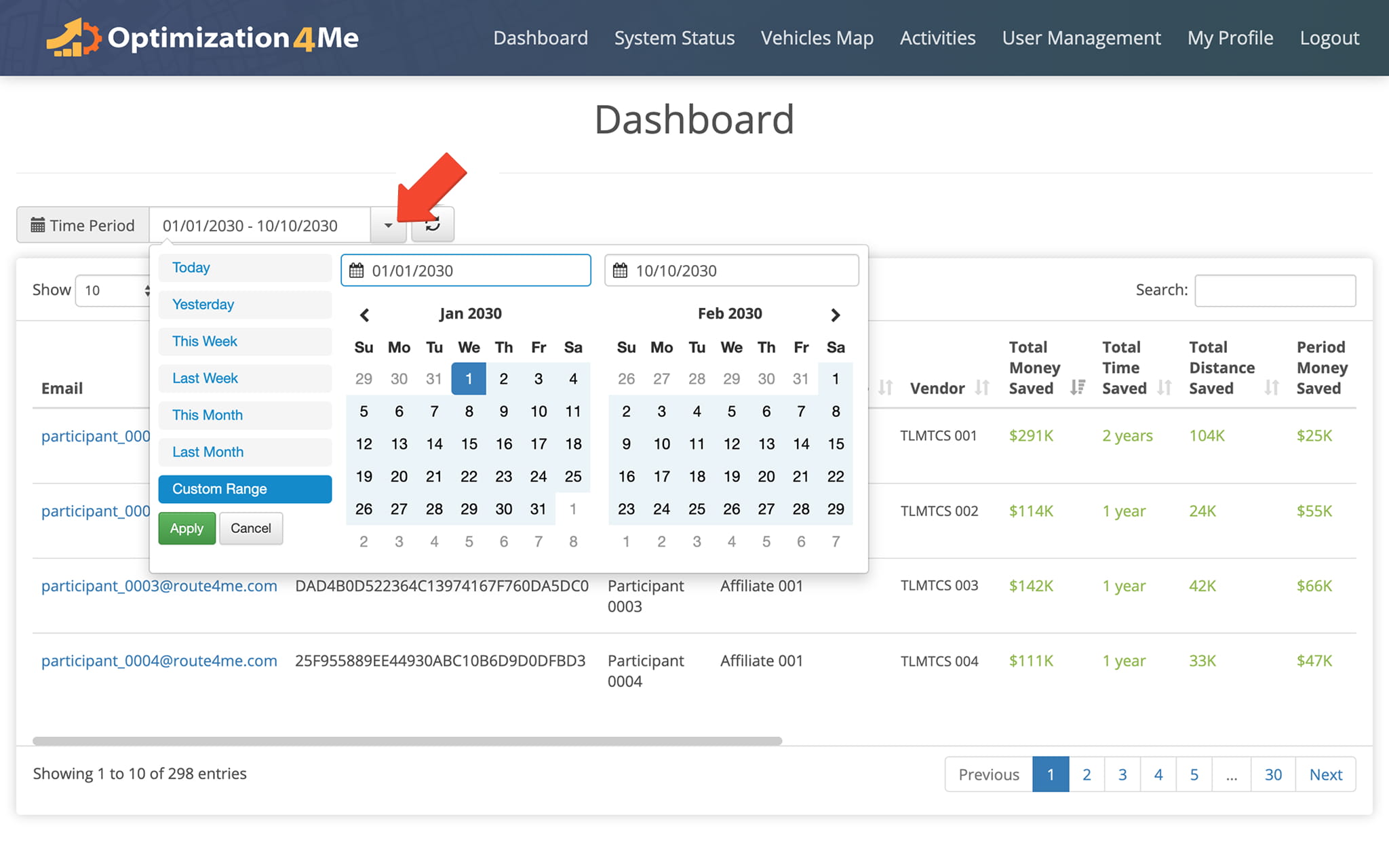
Business Summary Report – Fleet Performance And Metrics
The Business Summary provides an aggregated view of fleet performance using Actual (Baseline) telematics data from vehicles, routes, and operational activity. This data is used to generate As-Is and Optimized routing results for performance comparison.
The table below outlines the core metrics used to evaluate fleet performance, efficiency, and operational costs.
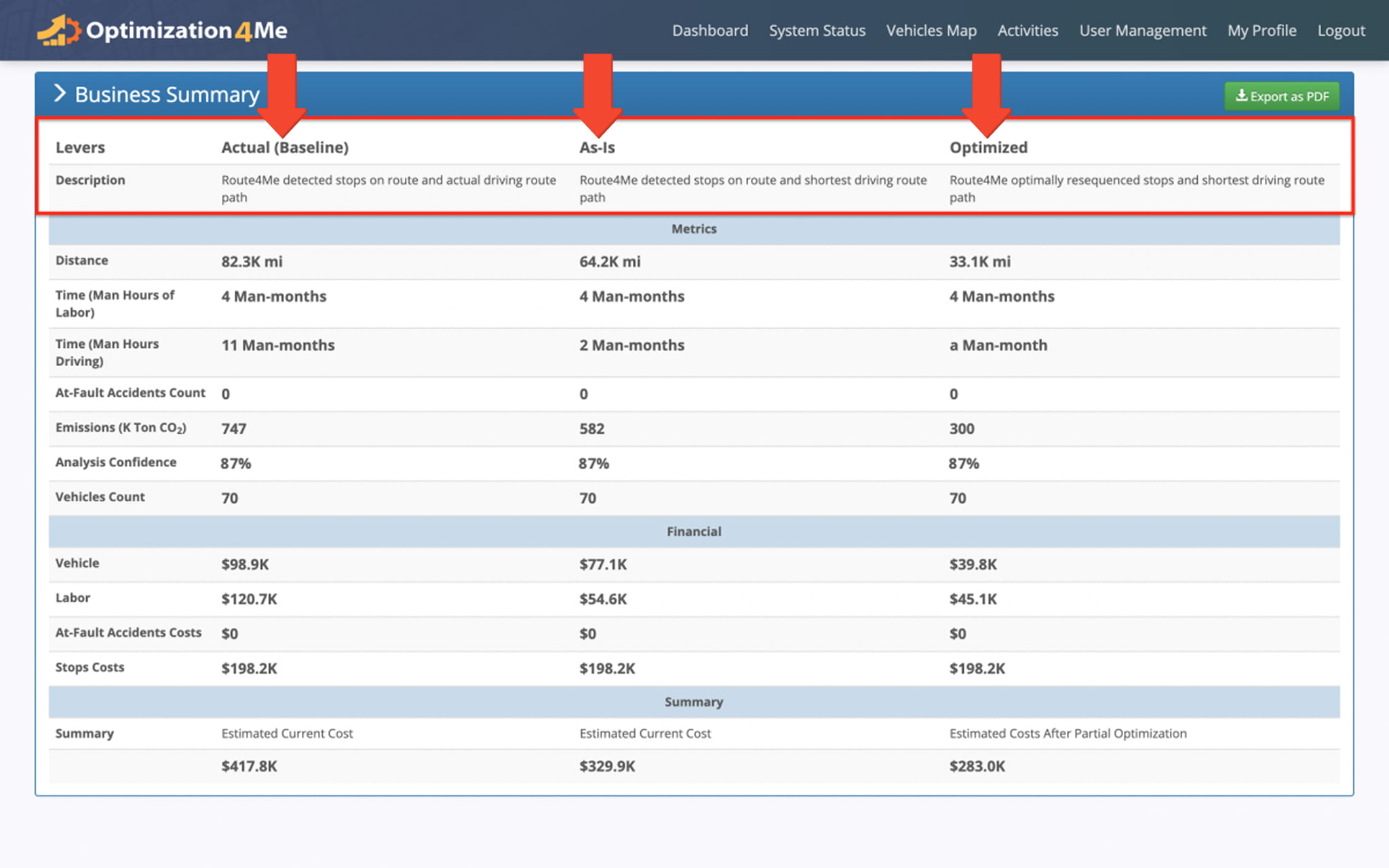
Business Summary Report - Fleet Metrics
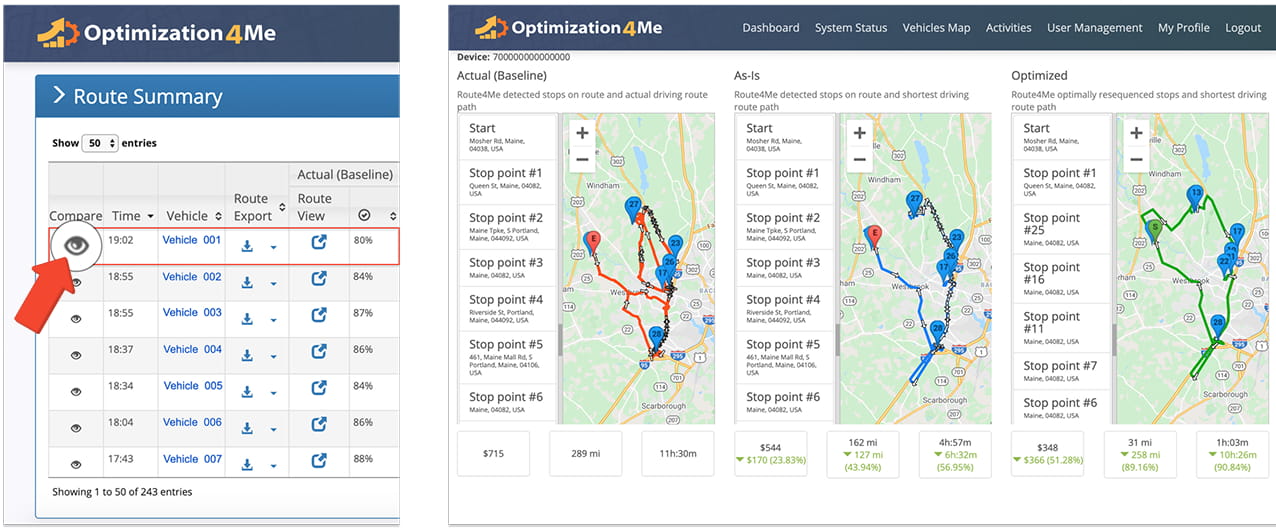
Route Summary Report – Actual Vs. Optimized Route Performance Overview
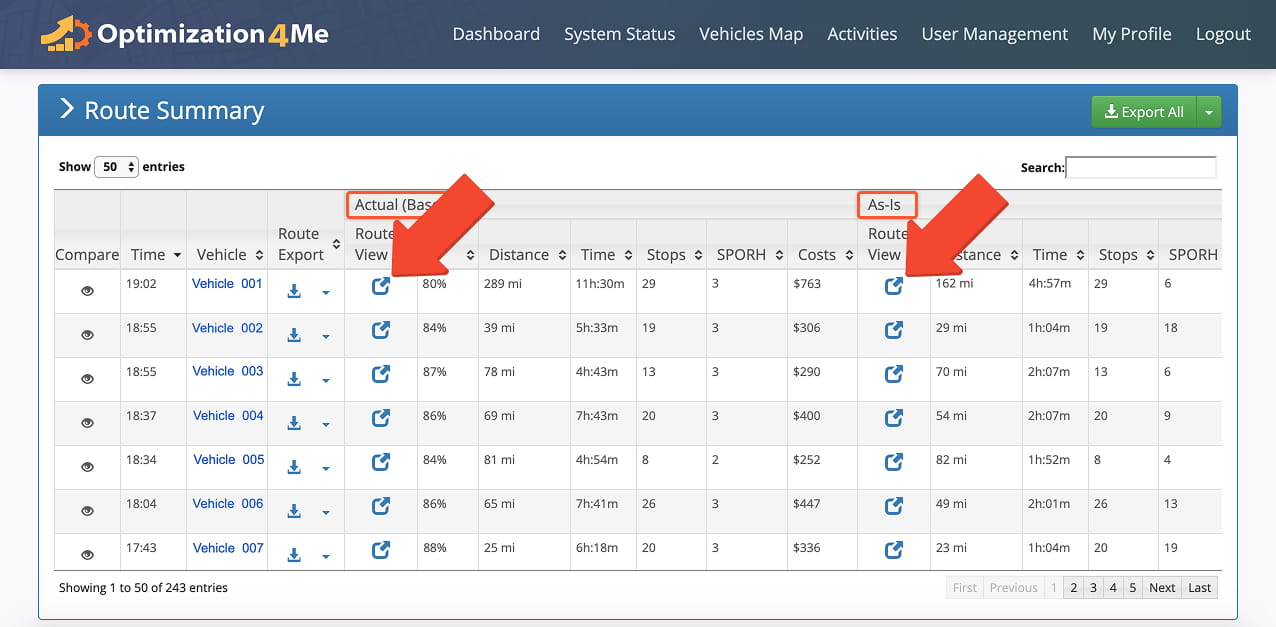
The Route Summary provides a consolidated view of routing activity across Actual (Baseline), As-Is, and Optimized routes. It compares real-world route execution with detected and optimized routing scenarios for insights into performance and efficiency.
Users can open individual routes to view visual route representations alongside associated performance data. This helps identify inefficiencies and evaluate how optimization impacts overall routing behavior.
Users can access a side-by-side comparison of route performance activity across Actual (Baseline), As-Is, and Optimized scenarios.
The comparison includes a map view of each route version, enabling users to visualize routing paths and compare performance metrics such as distance, time, and efficiency outcomes.
Vehicles Map – Real-Time Fleet Tracking And Visibility
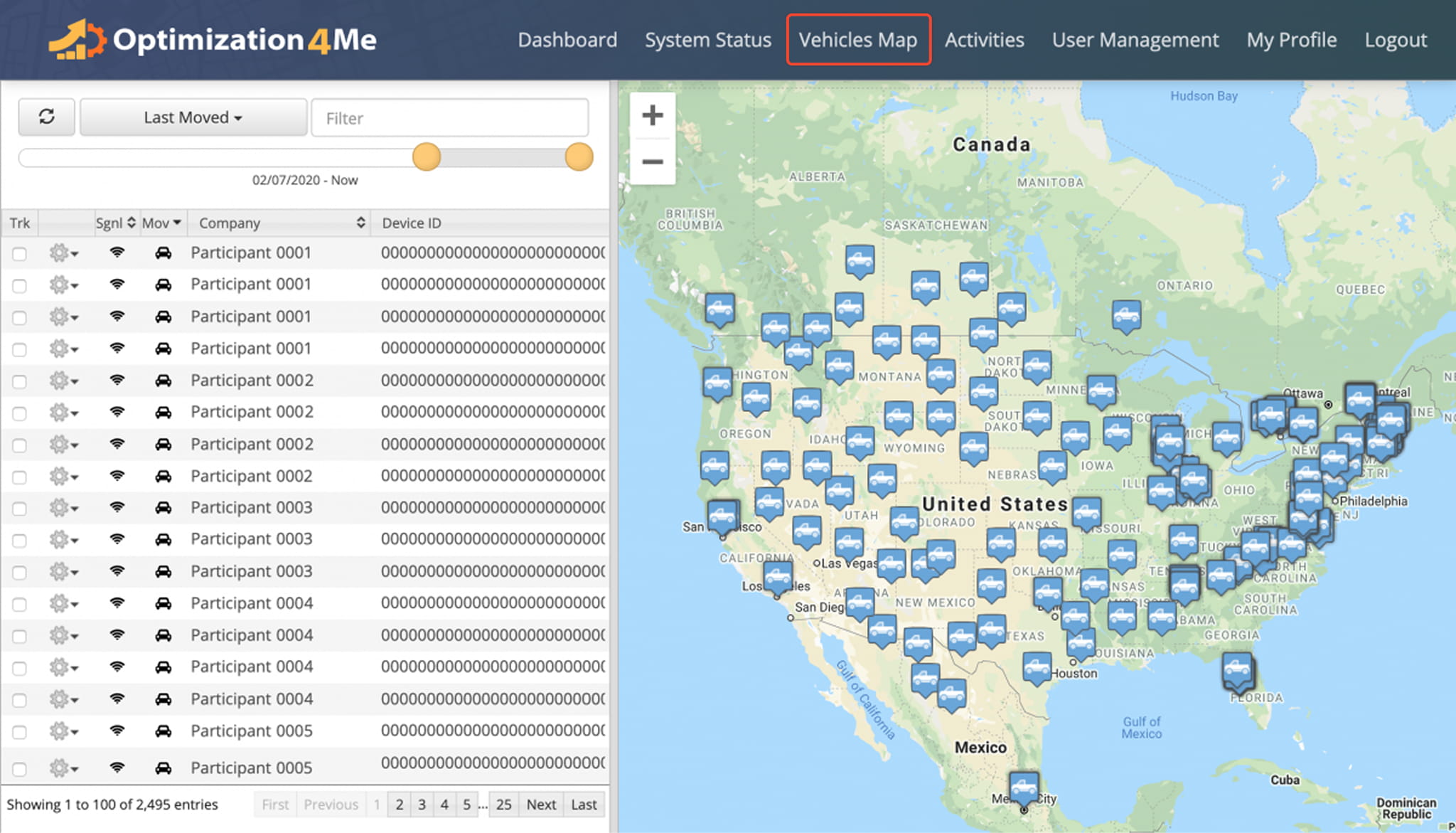
The Affiliate Vehicles Map in Operational Assessment provides a centralized, map-based view of all vehicles associated with Participants under an Affiliate account. It displays real-time fleet tracking data imported through active Telematics Connections:
- Real-Time Fleet Visibility: View live vehicle locations across all Participants in a single map interface.
- Centralized Tracking View: Monitor fleet activity from multiple Participants without switching between systems.
- Telematics-Driven Data Display: Automatically visualize vehicle movement and location data imported through connected telematics providers.
Operational Assessment Glossary – Terms And Definitions
Below is a glossary of operational terms associated with Optimization4Me, Route4Me’s Operational Assessment system:
Operational Assessment Glossary
Optimization4Me FAQs – Insights Into Operational Assessment
If you’re unable to find the answer you’re looking for, please contact your Route4Me Routing Expert for assistance.
Optimization4Me is designed to transform customers’ raw telematics data into actionable savings. To achieve that, the Operational Assessment Tool will analyze your customers’ telematics data, uncover optimization opportunities, and propose dynamically optimized routing solutions.
Showing customers how much they can save through route optimization is significantly more effective than simply describing potential future benefits. That being said, conducting a traditional return on investment (ROI) analysis for each customer is often extremely time-consuming and expensive. With Route4Me’s OA Tool, you can automate the analysis process and generate actionable insights that help accelerate sales conversations.
Your Participants’ telematics data is automatically imported into your OA Affiliate account → The imported telematics data is processed and analyzed to detect stops, depots, and route activity → The OA Tool creates route scenarios (Actual (Baseline), As-Is, and Optimized) → Route scenarios, savings, and other OA results are presented in the form of interactive Dashboards, Maps, and Summaries.
To sign up, you need to get a registration or login link from your Route4Me Routing Expert.
Once you sign up or get access to your OA Affiliate account, you need to add Participants (Participant OA accounts) to your organization (OA account) and establish Telematics Connections between your Participants’ OA accounts and their Telematics Vendor accounts.
Once the corresponding Telematics Connections are established, telematics data from your Participants’ Telematics Vendor accounts will automatically import into their OA accounts.
You will then be able to view this data in your OA Affiliate Dashboard, Participant Reports, Business Summaries, Route Summaries, Vehicles Map, and other OA interfaces.
An Affiliate is a Route4Me partner who has the Route4Me Operational Assessment (OA) system integrated into their business to analyze customer telematics data, attract new customers, or resell Route4Me services under their own brand.
Participants are the customers, companies, or end-users associated with a Route4Me Affiliate.
There are the following Operational Assessment entities: OA Affiliate, OA Participant, OA Device, GPS Signals, Depots, Routes, Stops.
The following Operational Participant device types are available: Generic Telematics Device, Enhanced Telematics Device, Smartphone App.
To learn more about Operational Assessment entities, user role permissions, and participant device types, visit this page.
To start importing telematics data from the telematics device(s) of a particular Participant (company) into your OA Affiliate account for analysis and optimization, you need to create a new Telematics Connection between this Participant’s OA account and Telematics Vendor account.
A Telematics Connection is the gateway through which telematics data travels from the Participant’s Telematics Vendor account to the Participant’s OA account.
Once a Telematics Connection is established, tracking and vehicle data captured by the Participant’s telematics devices is automatically imported from the Telematics Vendor into the Participant’s OA account.
(Telematics Device → Telematics Vendor → (Telematics Connection) → Participant’s OA Account → Your OA Affiliate account)
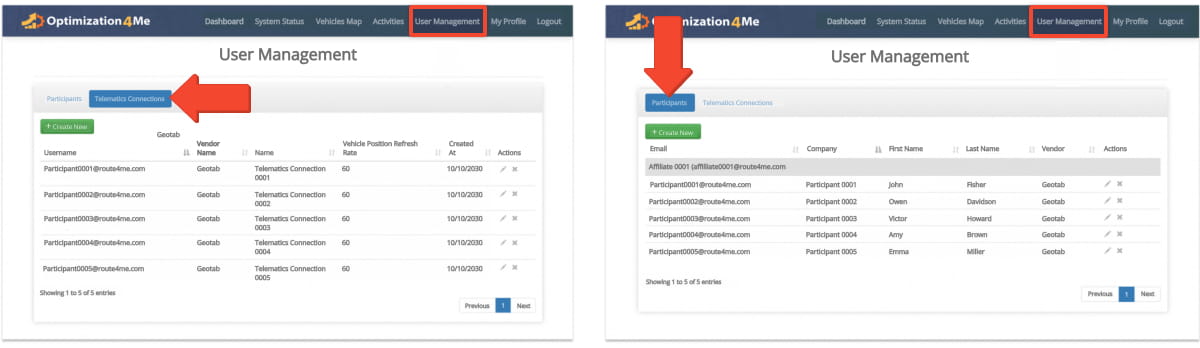
To create a new Participant in your OA Affiliate account:
- Go to “User Management” from the navigation menu at the top.
- Go to the “Participants” tab.
- Click the “Create New” button in the “Participants” tab.
To learn more about creating new Participants in your organization/OA Affiliate account, visit this page.
To learn more about viewing and managing all Participants associated with your OA Affiliate account, visit this page.
To create a new Telematics Connection in your OA Affiliate account:
- Go to “User Management” from the navigation menu at the top.
- Go to the “Telematics Connections” tab.
- Click the “Create New” button.
To learn more about creating new Telematics Connections in your OA Affiliate account, visit this page.
To learn more about managing Telematics Connections in your OA Affiliate account, visit this page.
Once you establish Telematics Connections between your Participants’ OA accounts and their Telematics Vendor accounts, you will be able to see your Participants’ telematics data and optimization results in your OA Affiliate Dashboard, Participant Reports, Business Summaries, Route Summaries, Vehicles Map, and other OA interfaces.
Depending on the number of established Telematics Connections and the amount of telematics data sent from your Participants’ Telematics Vendors, it can take up to 7 days until the OA Tool receives and analyzes enough telematics data to provide accurate routing and savings results.
The OA Tool is self-learning – the system learns your routes, route schedules, and other types of imported telematics data to improve the accuracy of the OA analysis and dynamic detection. Thus, the more data is imported into your OA Affiliate account, the more operational visibility and actionable insights your OA Dashboards, Participant Reports, Business Summaries, and other interfaces will show.
Visit Route4Me's Marketplace to Check out Various Modules and Add-Ons:
- Operations
Advanced Team Management Add-On
About author: Daniel Archer

