System Consumption – View Requests To Route4Me Server Endpoints
Your System Consumptions page provides a summary of the different requests made from your account to Route4Me’s server endpoints. You can use this information to monitor usage, optimize performance, troubleshoot potential issues, and more. Use this guide to better understand how your System Consumption page works.
Access Your System Consumption Page – View All Endpoint Requests
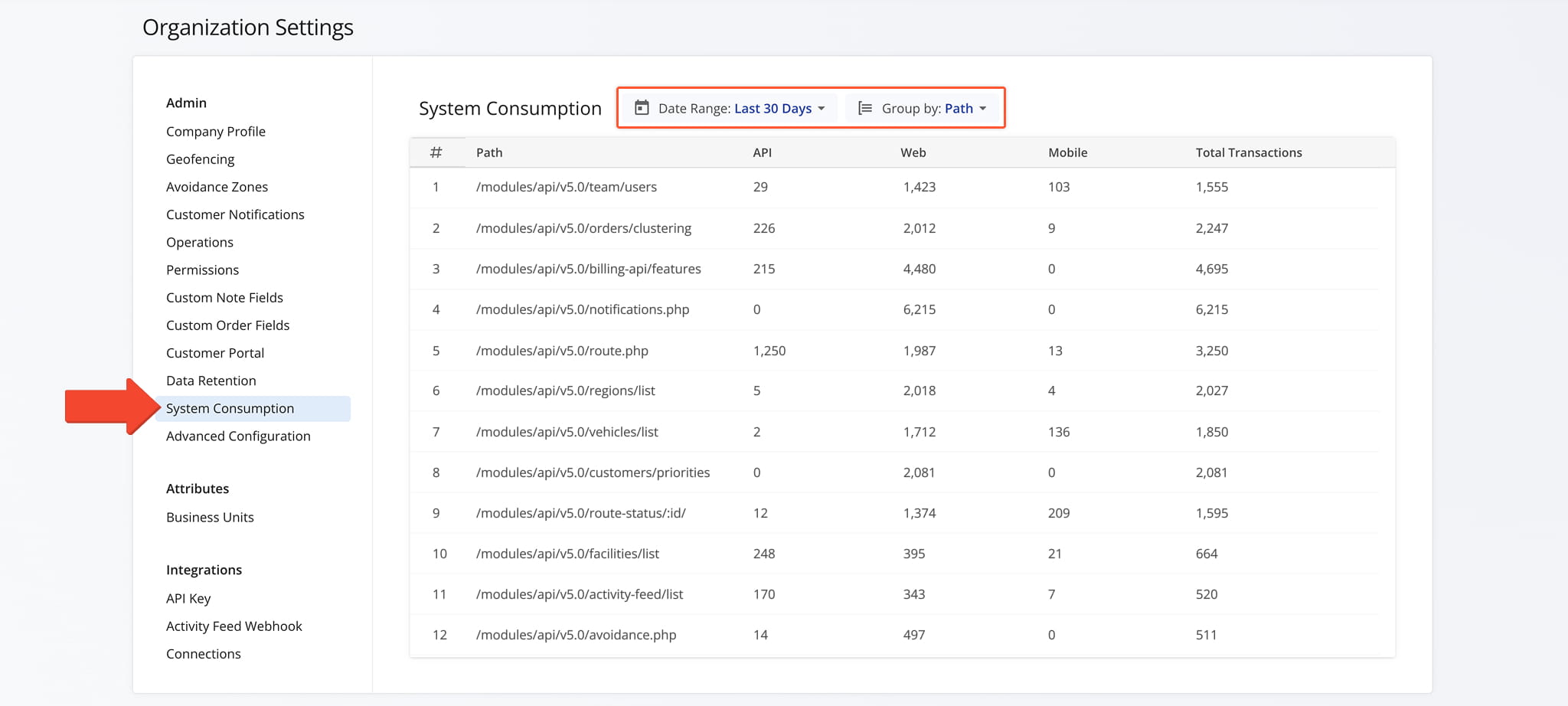
To access your System Consumption page, click “Settings” > “Organization Settings” in the Navigation Menu. From your Organization Settings page, scroll down to “System Consumption“.
This page gives an overview of the requests your account has made to Route4Me’s server endpoints.
You can see how many times each endpoint was accessed, whether through a third-party API integration, the Route4Me website, or a mobile device. To narrow the data, filter by “Date Range” or use “Group By” to sort by Path, Member, or IP.
Open Your System Consumption Page
Visit Route4Me's Marketplace to Check out Associated Modules:
- Operations
Custom Data Add-On
- Operations
Advanced Team Management Add-On
About author: Daniel Archer