Manage Recurring Routes – Modify Routes From Your Routes List

Recurring Routes are scheduled routes generated from a Master Route. From the Routes List, you can search, filter, and view all Recurring Routes in one place. You can also edit individual Recurring Routes without affecting the original Master Route. This guide explains how to access, modify, and understand Recurring Routes.

Access, search, filter, and edit Recurring Routes from the Routes List without affecting the Master Route.


Access Recurring Routes – Use Search, Filter, And Sorting Options

From your Routes List, you can view all Recurring Routes.

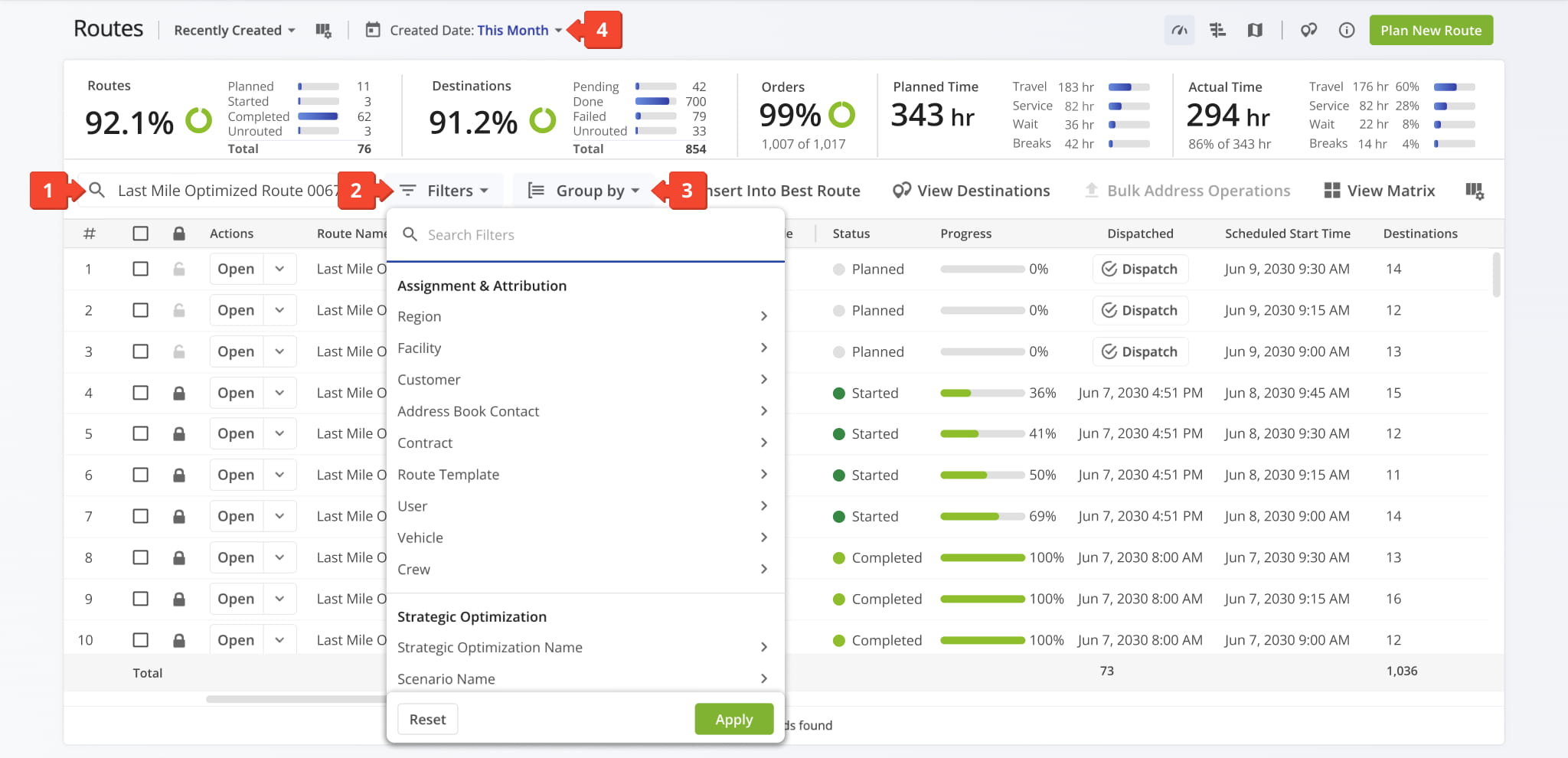
To find a specific Recurring Route, (1) search for it by its Master Route name. If you have a large number of Recurring Routes, expedite your search by adjusting the (2) “Filters“, (3) “Group By“, and/or (4) “Created Date” options.

Open Your Routes List

From your Routes List, view all Recurring Routes or search by Master Route name to find a specific one.


Modify Recurring Routes – Edit Route Settings And Details

To edit a Recurring Route, click the Down Arrow button and select “Edit“. NOTE: When you edit an individual Recurring Route, no changes are made to its associated Master Route or to other Recurring Routes.

The table below details which data fields are transferred from the Master Route to the Recurring Route during route creation.
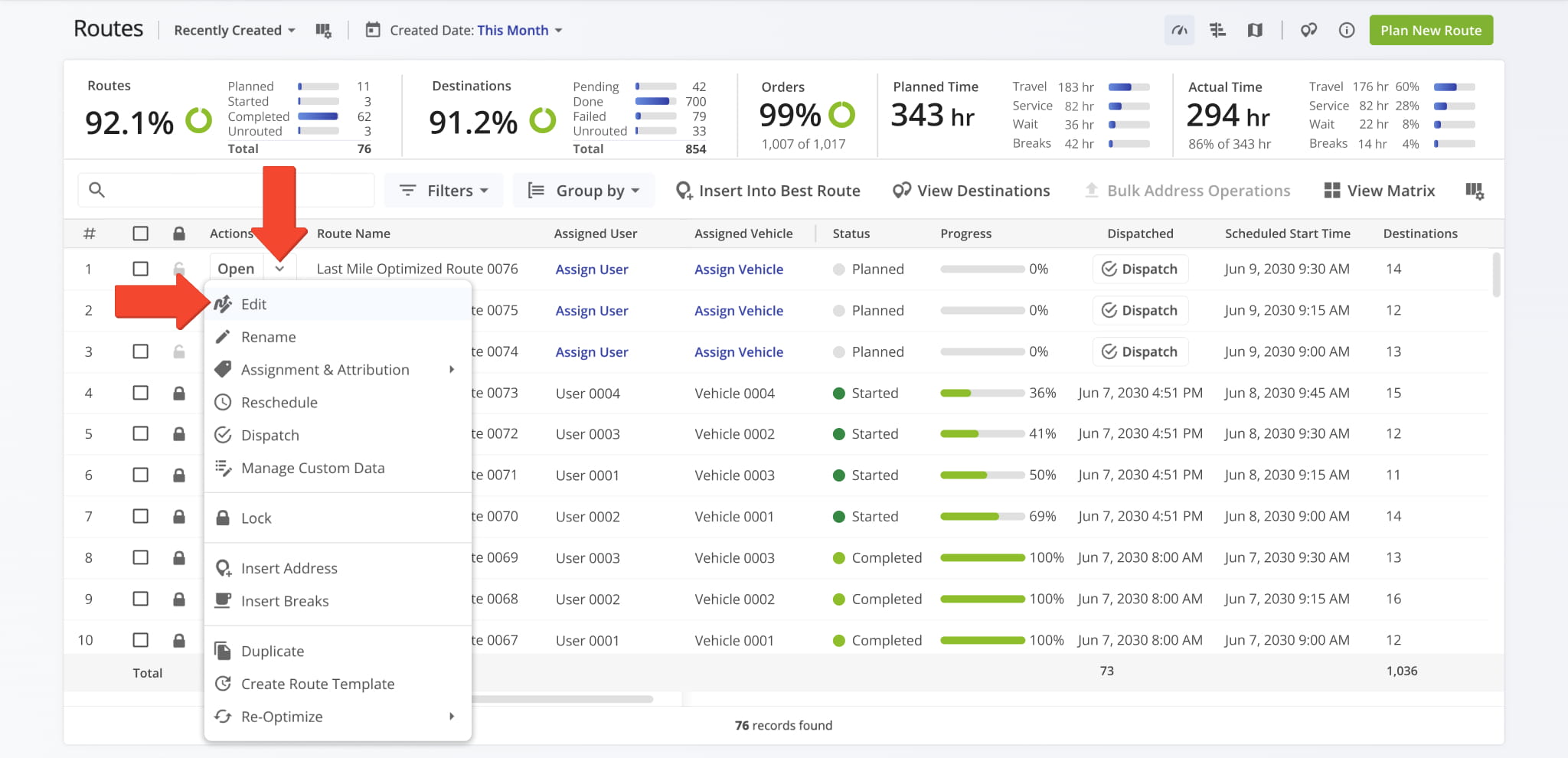
From your Routes List, view all Recurring Routes or search by Master Route name to find a specific one.

DataMaster RouteRecurring Route
Route
Date Created
Planned Total Distance
Planned Total Route Duration
Planned Total Travel Duration
Planned Total Wait Duration
Planned Total Service Duration
Planned Total Break Duration
Schedule Timezone
Master Route Source
Scheduled Start Time
Planned End Time
Start Timezone
Total Man Hours
Assignment & Attribution
Facility
Customer
Contract
Key Metrics
Destinations Count
Pending Destinations 
Failed Destinations
Skipped Destinations
Completed Destinations
Customer Requested Time Window Adherence
Destinations Arrived On-Time (User Actioned) 
Destinations Arrived Early (User Actioned)  
Destinations Arrived Late (User Actioned)  
Operational Status
First Access Time
Status 
Dispatch 
Progress Metrics
Arrived Destinations (User Actioned)
Destinations Arrived (Progress %) (User Actioned) 
Actual Route Distance
Actual Total Distance (Mobile App)
Actual Total Distance (Telematics) 
Actual Total Distance (Merged) 
Actual Duration
Actual Route Duration (User Actioned)
Actual Total Route Duration (Grand Total Of All Sub-Durations) 
Actual Total Travel Duration (User Actioned) 
Actual Total Service Duration (User Actioned)  
Actual Total Wait Duration (User Actioned)  
Actual Total Breaks Duration (User Actioned)
Actual Total Unattributed Duration (User Actioned) 
Actual Service Time
Actual Total Service Time (Auto Detected) 
Actual Travel Duration
Actual Total Duration (Mobile App) 
Actual Total Duration (Telematics) 
SLA
Out Of Sequence Destinations (#) 
Out Of Sequence Destinations (%) 
Utilization – Pieces / Unit
Pieces Planned 
Pieces Completed
Pieces Completed (%)
Pieces Remaining At End (%)
Utilization – Weight
Weight Planned 
Weight Completed
Weight Completed (%)
Weight Remaining At End (%)
Utilization – Cube
Cube Planned 
Cube Completed
Cube Completed (%)
Cube Remaining At End (%)
Utilization – Revenue
Revenue Planned 
Revenue Completed
Revenue Completed (%)
Revenue Remaining At End (%)
Strategic Optimization
Strategic Optimization Name 
Scenario Name 


Last Updated:

About author: Daniel Archer

Daniel ArcherWith a background in pedagogy and writing instruction, Daniel is a former tenured English Instructor who, after nearly 20 years of teaching, transitioned into content strategy and leading writing teams for global brands. Now, as Technical Documentation Manager at Route4Me, he translates complex logistics technology into clear, accessible content that empowers users.

Was this article helpful?
Still can't find what you're looking for? Contact us
Route4Me

About Route4Me

Route4Me has over 40,000 customers globally. Route4Me's Android and iPhone mobile apps have been downloaded over 2 million times since 2009. Extremely easy-to-use, Route4Me's apps create optimized routes, synchronize routes to mobile devices, enable communication with drivers and customers, offer turn-by-turn directions, delivery confirmation, and more. Behind the scenes, Route4Me's operational optimization platform combines high-performance algorithms with data science, machine learning, and big data to plan, optimize, and analyze routes of almost any size in real-time.