
Assets – Add And Manage Delivery Assets, Containers, Trailers And Equipment
Route4Me’s transportation and enterprise resource management software offers multiple tools for managing your entire business on a single Web Platform. With the Assets Page, you can easily add, organize, and manage your physical assets and equipment like containers, trailer, etc. Whether you have five forklifts or five hundred drones, Routre4Me’s Assets functionality enables you to filter, group, and customize your logistics equipment information in a centralized database, track equipment location on a live map, and more. Keep reading to learn about asset and equipment management.
Table of Contents
Open Assets Page – Enterprise Asset And Equipment Database
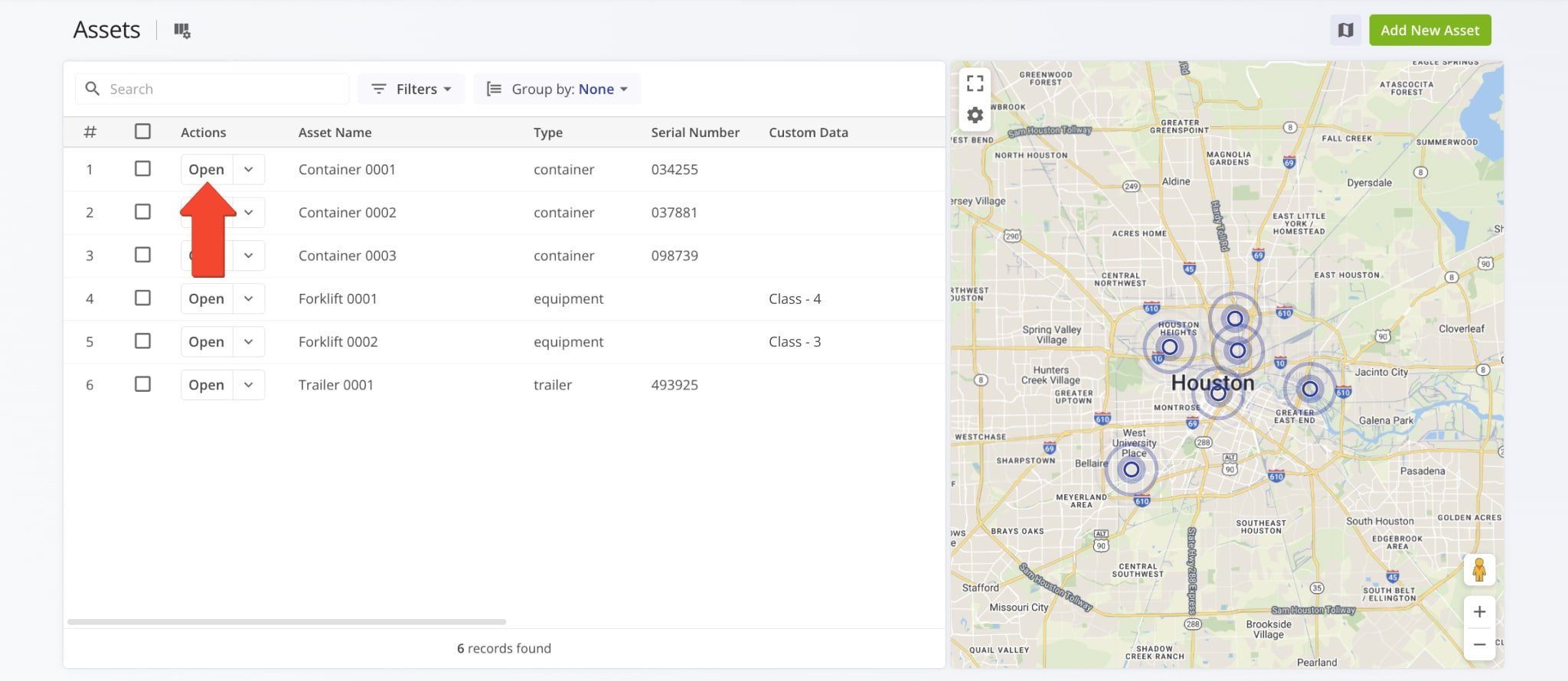
To open your Assets Page, simply go to “Team & Equipment” > “Assets” from the Platform Menu.
From here, you can add and manage assets and equipment, filter and group your enterprise assets, and more. To open an Asset Snapshot with more detailed information about a specific Asset, simply click the “Open” button next to it.
Add Assets – Create Data Entries For Physical Assets And Equipment
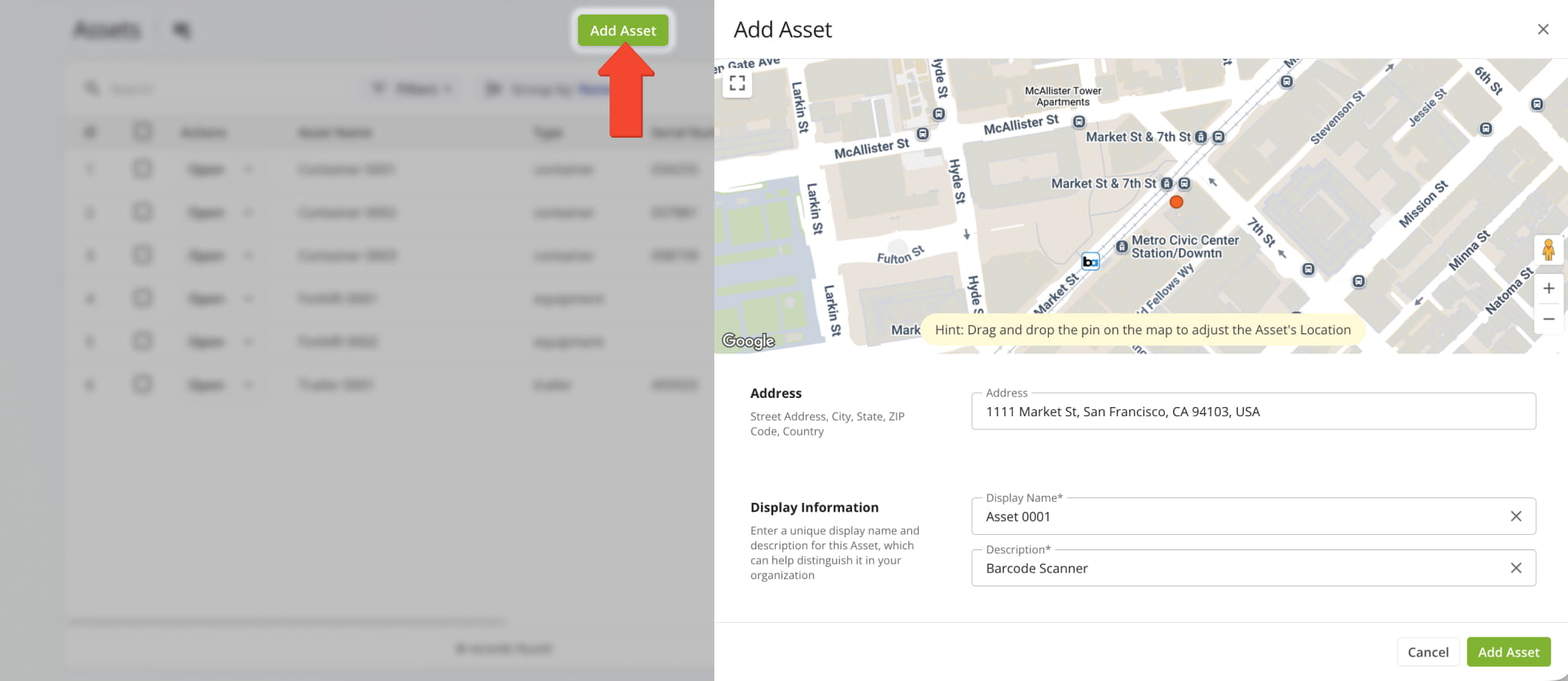
Adding physical assets and equipment to your Route4Me account is easy. Click the “Add New Asset” button in the top-right of the Assets Page. Then, fill out the relevant fields in the “Add New Asset” panel and click “Add Asset” to finalize.
See the table below for a description of all available fields when creating new asset and equipment entries.
| Field | Description | |
|---|---|---|
| General | ||
| Alias | Assign a unique name to the asset, making it easy to identify and locate within your database. | |
| Asset Type | Define a custom Asset Type appropriate for your equipment and organization. For example, “container“, “trailer“, “equipment“, etc. | |
| Asset Info | Enter essential information that identifies this asset, including its make, model, year, type, and unique identification number. | |
| Connection | ||
| Telematics Connection | Select one of your existing Telematics Connection to associate the asset with your Telematics Provider. | |
| Details | ||
| Custom Data | Define custom attributes or information of assets and equipment on your account. | |
Manage Assets – Open, Edit And Delete Assets On Your Account
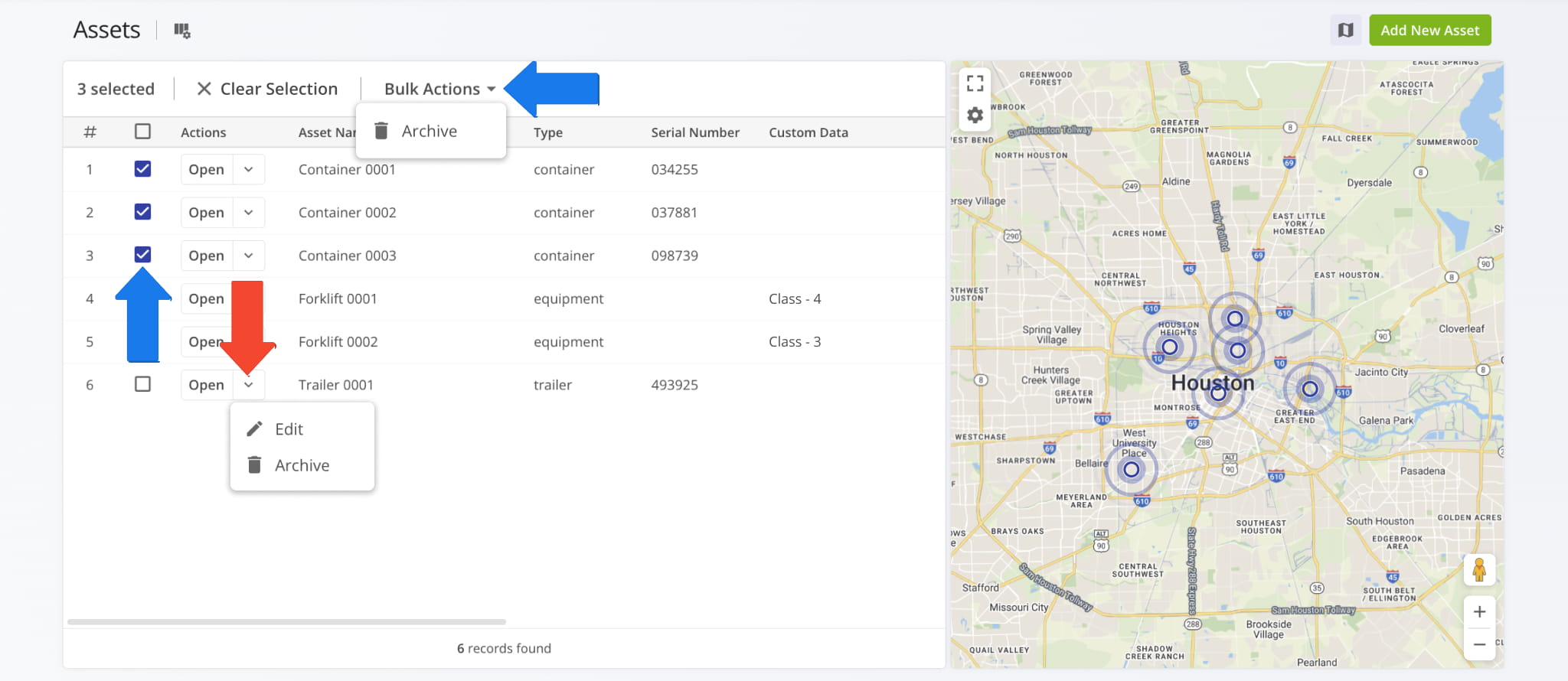
To edit existing Assets, click the Down Arrow next to an Asset and select “Edit Asset“. To Archive Assets on your account, select one or more by checking the boxes next to them. Then, click “Bulk Action” and select “Archive“.
Asset Filters And Grouping Options On Last Mile TMS
The Assets Page enables you to easily find, filter, and group Assets. To do so, click “Filters” or “Group by” above the Assets List. You can also use the “Search” field to find specific Assets by entering an alias or other Asset attribute.
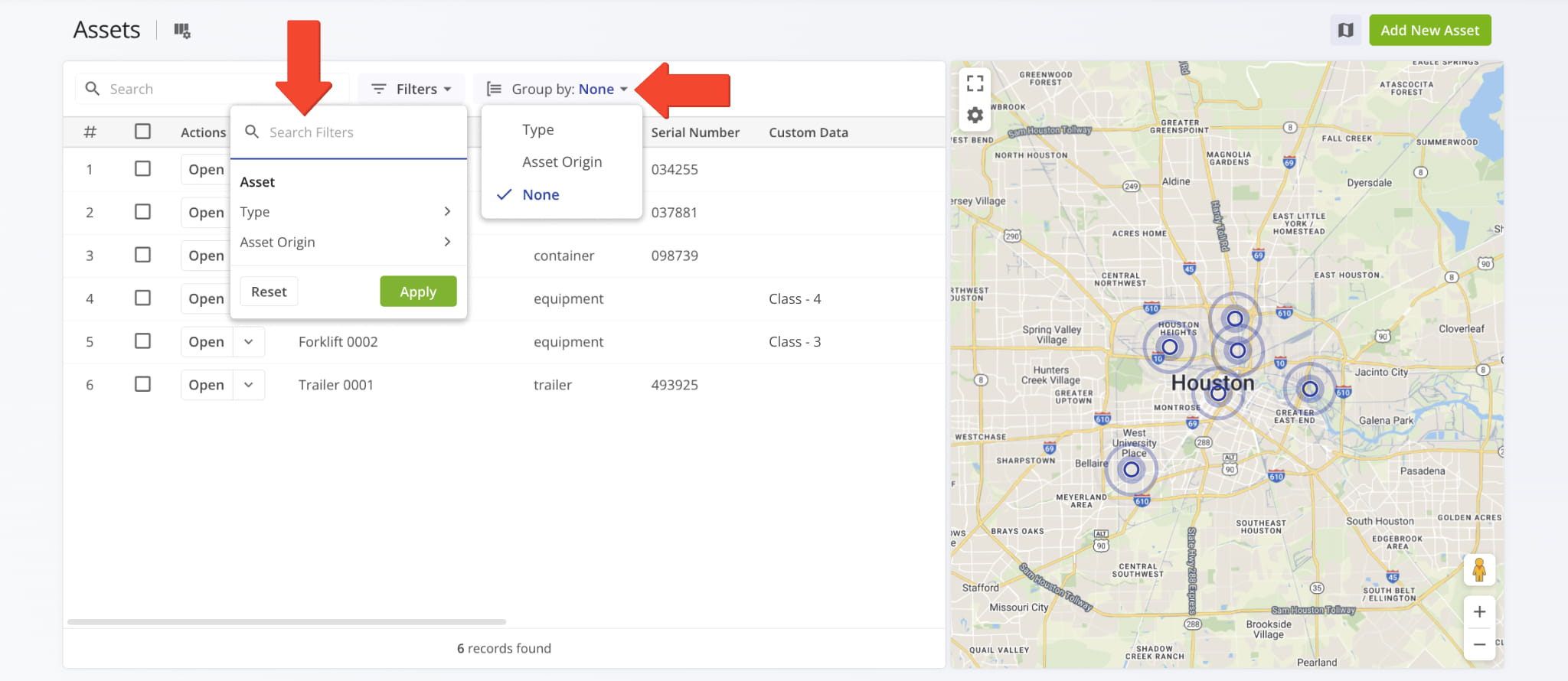
| Option | Description | |
|---|---|---|
| Filters | ||
| Model | Filter assets and equipment by their specific asset design or model. | |
| Year | Filter assets and equipment by the year the asset’s design or version was manufactured. | |
| Type | Filter assets and equipment by their asset type. | |
| Telematics Connection | Filter assets and equipment by the Provider or Telematics Connection the asset is associated with. Used for vehicle trailers and similar assets. | |
| Group by | ||
| Type | Group assets and equipment by their asset type. | |
| Vehicle | Group assets and equipment by the vehicle they’re associated with. | |
| Facility | Group assets and equipment by the Facility they’re associated with. | |
| None | Don’t group assets and equipment. This is the default value. | |
Assets Map – Dynamic Real-Time Asset And Equipment Tracking
To view where trackable Assets are located, simply click the Map Button in the top-right to open the Assets Map. The last-synched location of Assets and equipment will automatically be shown on the map.
Additionally, click the Gear Icon to enable overlays to see where Assets are in relation to your Avoidance Zones, Territories, and Facilities. See the table below to learn more about Asset Map options and layers.
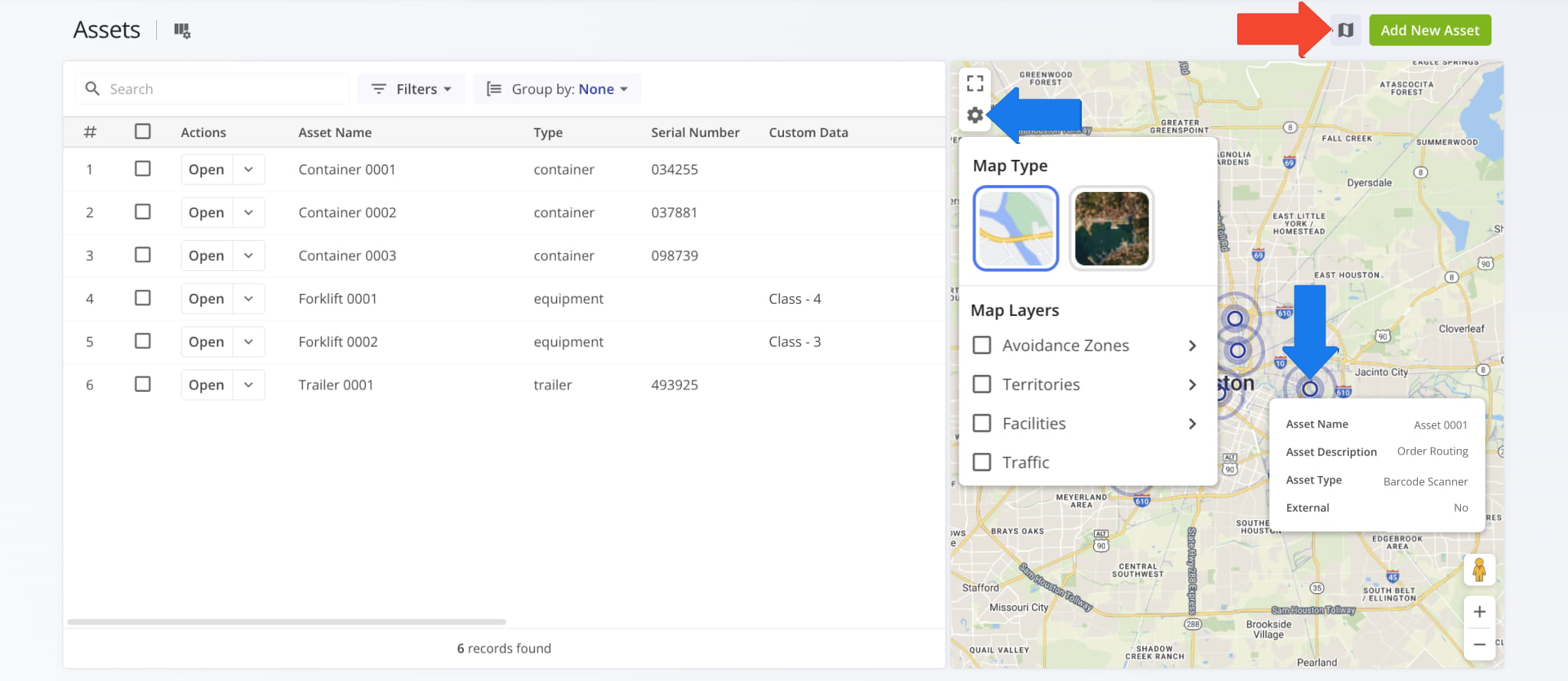
| Option | Description | |
|---|---|---|
| Map Type | ||
| Road Network | Default road network map mode where you can easily see Asset locations. | |
| Satellite | Switch to a satellite map mode to get more visual context. | |
| Map Layers | ||
| Avoidance Zones | Display geographic Avoidance Zones and no-go areas from your account on the map. | |
| Territories | Display Territories from your account on the map. | |
| Facilities | Display the location of Facilities from your account on the map. | |
| Traffic | Display live traffic overlays on the map’s road network. | |
Data Columns – Customize Asset Data Table And Information
With Route4Me, you can customize any data table on your TMS Web Platform. To enable data columns on your Assets Page and edit their order, click the Columns Button in the top-left. Then, check boxes next to data items to enable them. To change their order, drag and drop column names on the right of the “Display Columns” panel. Click “Apply” to save your changes.
See the table below for a list of data columns available on your Assets Page.
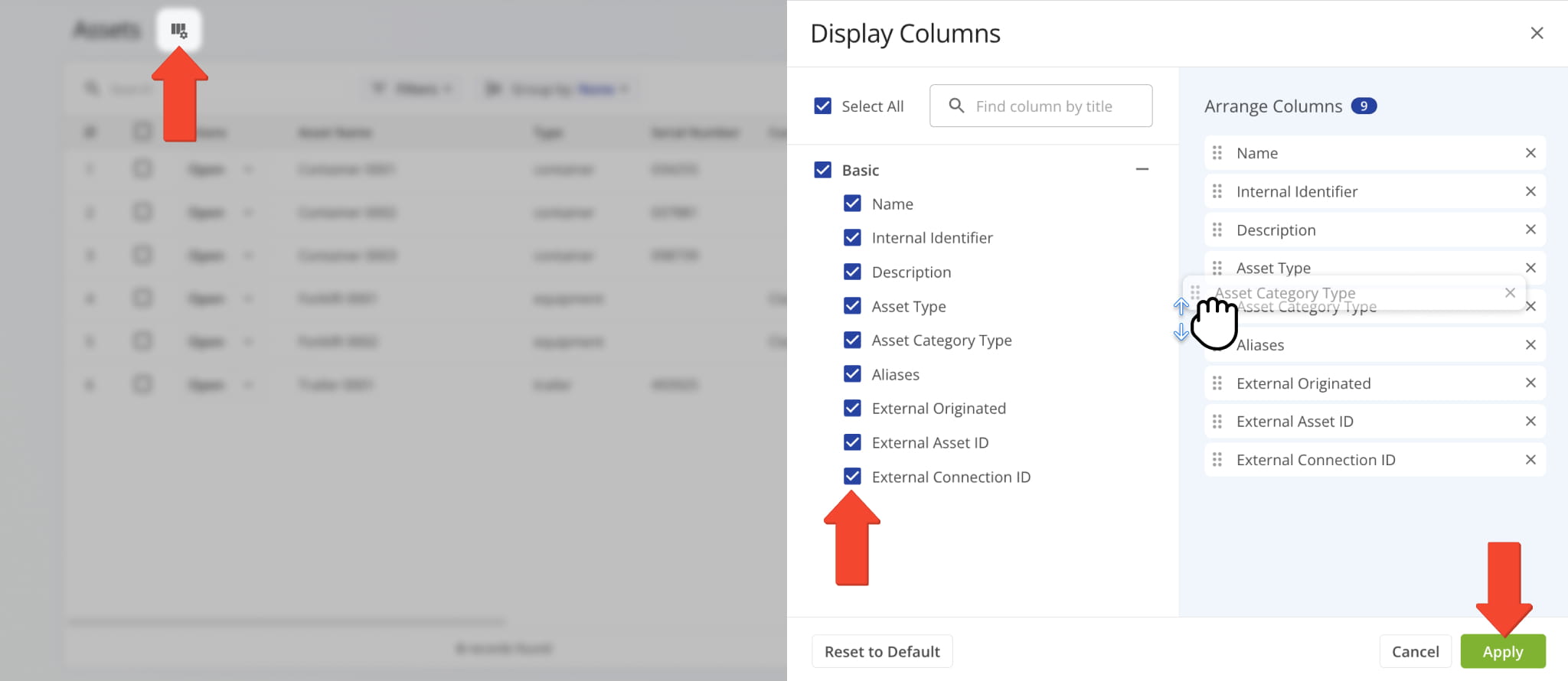
| Column | Description |
|---|---|
| Asset Name | Alias or name of the asset used to identify it and find it using the search function. |
| Make | Brand or manufacturer of the asset. |
| Type | Equipment or asset type. |
| Model | Specific asset design or model. |
| VIN | Vehicle Identification Number, a unique code used to identify vehicle assets like trailers. |
| Plate Number | Asset’s unique license plate number, issued for identification. |
| Year | Year the asset’s design or version was manufactured. |
| Serial Number | Asset’s unique serial number. |
| Custom Data | Additional data associated with the asset. |
| Notes | Information added to the asset by users or additional information associated with the asset. |
| Connection Name | Provider or Telematics Connection the asset is associated with. Used for vehicle trailers and similar assets. |
Pre-Configured Asset Types
Route4Me provides preconfigured asset types that you can use to quickly set up and manage equipment, containers, vehicles, and infrastructure. These asset types support RFID and barcode tracking for accurate identification and operational visibility.
If your organization requires asset types tailored to specific workflows or equipment categories, contact Route4Me Support to configure custom asset types that meet your operational needs.
| Asset Type | Description | |
|---|---|---|
| Waste & Environmental | ||
| Waste bin | Track and manage waste bins using RFID or barcode identification for accurate service and asset records. | |
| Garbage bin | Monitor garbage bins with RFID or barcode tracking to support collection and maintenance workflows. | |
| Recycling bin | Track recycling bins using RFID or barcode scanning to log service activity and status. | |
| Compost bin | Manage compost bins with RFID or barcode identification to monitor scheduled pickups and servicing. | |
| Hazardous-waste container | Track hazardous-waste containers using RFID or barcode systems to support compliance and handling records. | |
| Bio-medical waste bin | Monitor bio-medical waste bins through RFID or barcode tracking for controlled collection processes. | |
| Oil/chemical drum | Track oil and chemical drums using RFID or barcode identification to maintain handling and inventory visibility. | |
| Waste compactor | Manage waste compactors with RFID or barcode tracking to monitor servicing and operational status. | |
| Skip container | Track skip containers using RFID or barcode systems to oversee deployment and pickup activity. | |
| Street litter bin | Monitor public litter bins with RFID or barcode identification to support municipal servicing operations. | |
| Street sweeper | Track street sweepers as field assets using RFID or barcode-based identification. | |
| Underground waste container | Manage underground waste containers using RFID or barcode tracking to monitor access and servicing. | |
| E-waste bin | Track electronic waste bins with RFID or barcode identification for controlled recycling workflows. | |
| Recycling baler | Monitor recycling balers using RFID or barcode systems to log usage and maintenance activity. | |
| Organic waste digester | Track organic waste digesters with RFID or barcode identification to manage processing assets. | |
| Rainwater harvesting tank | Monitor rainwater harvesting tanks using RFID or barcode tracking to maintain inspection records. | |
| Public recycling station | Track public recycling stations with RFID or barcode systems for service coordination. | |
| Industrial shredder | Manage industrial shredders using RFID or barcode tracking to monitor operation and maintenance. | |
| Hazardous spill kit | Track hazardous spill kits with RFID or barcode identification to ensure availability and compliance. | |
| Glass recycling container | Monitor glass recycling containers using RFID or barcode tracking for collection visibility. | |
| Power & Energy | ||
| Diesel generator | Track diesel generators using RFID or barcode identification to monitor deployment and servicing. | |
| Portable generator | Manage portable generators with RFID or barcode tracking to maintain location and usage records. | |
| Solar panel/module | Track solar panels or modules using RFID or barcode systems for asset management and maintenance. | |
| Battery pack/UPS unit | Monitor battery packs or UPS units with RFID or barcode identification to support lifecycle tracking. | |
| Power transformer | Track power transformers using RFID or barcode systems to maintain inspection and service records. | |
| Electrical switchgear | Manage electrical switchgear with RFID or barcode tracking for asset visibility and maintenance logging. | |
| Circuit breaker panel | Track circuit breaker panels using RFID or barcode identification to monitor servicing and status. | |
| EV charging station | Manage EV charging stations with RFID or barcode tracking to support infrastructure oversight. | |
| Fuel tank | Track fuel tanks using RFID or barcode identification to monitor inventory and servicing. | |
| Power cable/reel | Manage power cables and reels with RFID or barcode systems to maintain asset accountability. | |
| Wind turbine | Track wind turbines using RFID or barcode identification to support maintenance scheduling. | |
| Hydroelectric turbine | Monitor hydroelectric turbines with RFID or barcode tracking for infrastructure management. | |
| Fuel cell | Track fuel cells using RFID or barcode identification to manage operational assets. | |
| High-voltage cable | Monitor high-voltage cables using RFID or barcode systems for inspection and asset tracking. | |
| Power inverter | Track power inverters with RFID or barcode identification to support equipment management. | |
| Smart meter | Manage smart meters using RFID or barcode tracking to maintain installation and service records. | |
| Battery management system | Track battery management systems with RFID or barcode identification for system oversight. | |
| Capacitor bank | Monitor capacitor banks using RFID or barcode tracking to log inspection and maintenance events. | |
| Lighting pole | Track lighting poles with RFID or barcode identification to support infrastructure maintenance. | |
| Grid monitoring sensor | Manage grid monitoring sensors using RFID or barcode systems to maintain operational visibility. | |
| Vehicles & Transportation | ||
| Delivery truck | Track delivery trucks using RFID or barcode identification to maintain fleet visibility. | |
| Forklift | Manage forklifts with RFID or barcode tracking to monitor usage and servicing. | |
| Pallet jack | Track pallet jacks using RFID or barcode identification to maintain warehouse asset control. | |
Visit Route4Me's Marketplace to Check out Associated Modules:
- Operations
Facilities
- Operations
Custom Data
- Analytics
Business Insights


