
Price List – Manage ERP Pricing Data
The Price List page gives enterprise business users a centralized view of all pricing information in their ERP system. You can review unit prices, sale quantities, discounts and totals, and track effective dates for pricing records. Filters, grouping, and customizable columns help streamline price management and ensure quick access to relevant data. Learn more in this guide.
Table of Contents
Filter And Group Price List Data
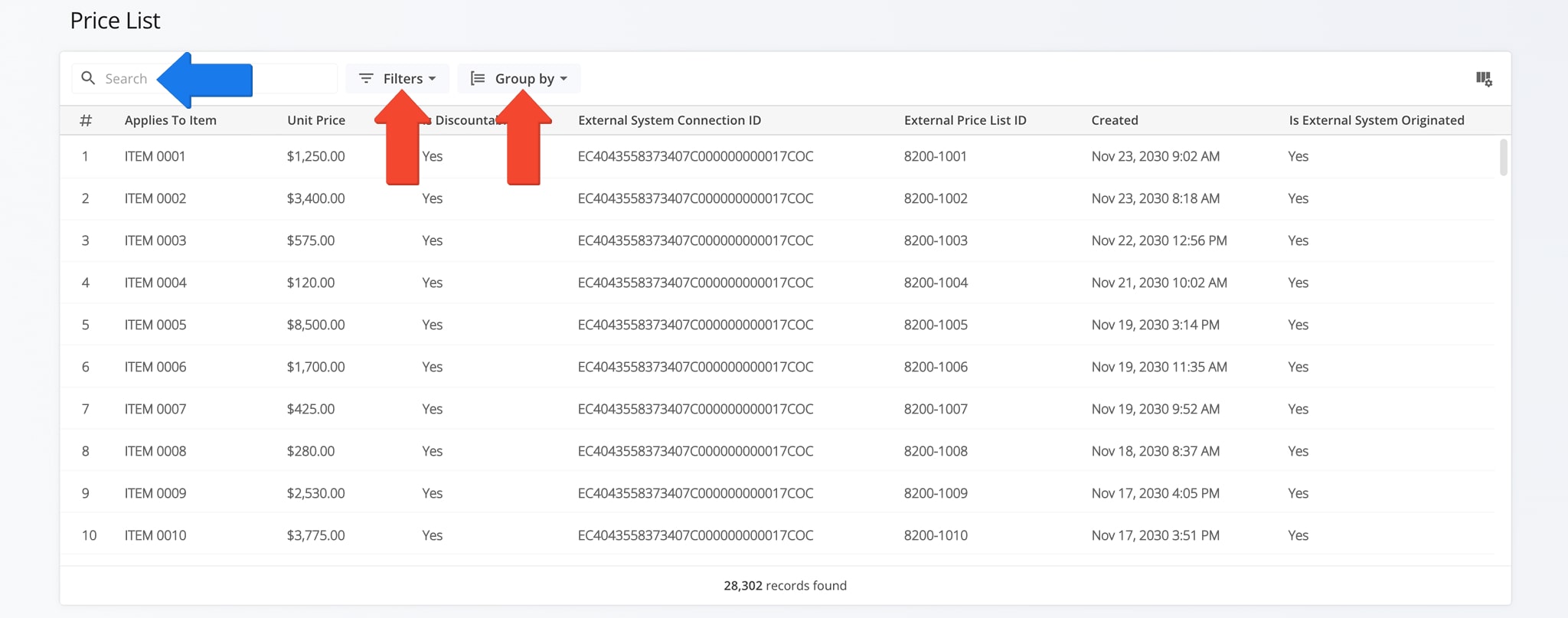
To access your Price List page, click “ERP” > “Price List” from the Navigation Menu.
You can filter and group Price List data to quickly locate specific records or organize information for analysis. The table below details all available Filter and Grouping options. Using these options help ensure accurate pricing management and reporting.
NOTE: You can also use the Search Field to locate specific records.
| Parameter | Description | |
|---|---|---|
| Filter Options | ||
| Unit Price | Filter price records by unit price. | |
| Minimum Sale Quantity | Show only records with a minimum sale quantity that meets specified criteria. | |
| Minimum Sale Total | Filter by the minimum total required for a sale. | |
| Customer | Filter prices for a specific customer. | |
| Maximum Sale Quantity | Show records below a maximum sale quantity. | |
| Maximum Sale Total | Filter by maximum total allowed for a sale. | |
| Grouping Options | ||
| Master Item | Group pricing records by master item to see related entries together. | |
| Customer | Group pricing records by customer. | |
| None | Display all pricing records without grouping. | |
View And Customize Price List Data
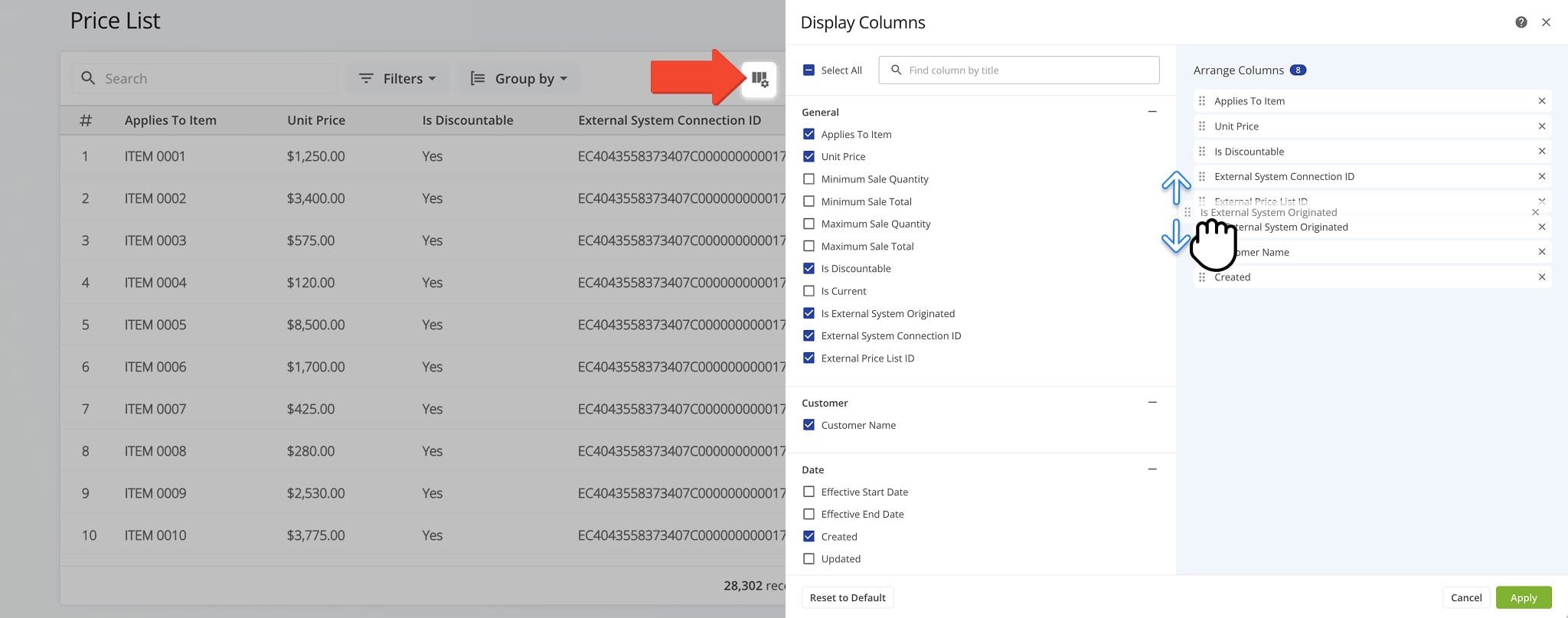
The Price List page displays multiple columns of pricing data which can be customized to show only the information most relevant to your needs.
To customize the data, click the Column Icon, check the boxes next to the columns you want to see, and drag columns to arrange their display order. The table below provides a complete overview of available columns.
| Column Name | Description | |
|---|---|---|
| General | ||
| Applies to Item | Indicates which item the pricing record applies to. | |
| Unit Price | The standard unit price for the item or service. | |
| Minimum Sale Quantity | The minimum quantity required for a sale at this price. | |
| Minimum Sale Total | The minimum total amount required for a sale at this price. | |
| Maximum Sale Quantity | The maximum quantity allowed for a sale at this price. | |
| Maximum Sale Total | The maximum total allowed for a sale at this price. | |
| Is Discountable | Indicates if the price can be discounted. | |
| Is Current | Shows whether this price record is currently active. | |
| Is External System Originated | Marks pricing records imported from an external system. | |
| External System Connection ID | Identifier for the external system integration. | |
| External Price List ID | ID of the price list in the external system. | |
| Customer | ||
| Customer Name | Name of the customer associated with this price record. | |
| Date | ||
| Effective Start Date | Date when this price becomes effective. | |
| Effective End Date | Date when this price record is no longer valid. | |
| Created | Timestamp when the price record was created. | |
| Updated | Timestamp of the last update to the price record. | |
Visit Route4Me Marketplace to Check Out More Add-Ons:
- Optimization
Address Book and Territories Planning
- Route Optimization
Commercial Vehicle & Truck Routing
- Operations
Audit Logging and Activity Stream
About author: Daniel Archer

