
Invoices – ERP Invoice Management And Reporting
The Invoices page gives enterprise business users a centralized view of all customer invoices within their last mile route software. You can quickly review invoice details, track statuses, and organize records efficiently. Filters, grouping, and customizable columns help streamline invoice management and ensure easy access to relevant data. Learn more in this guide.
Table of Contents
Filter And Group Invoice Data – Search Invoices By Parameters
To access your Invoice page, click “ERP” > “Invoices” from the Navigation Menu.
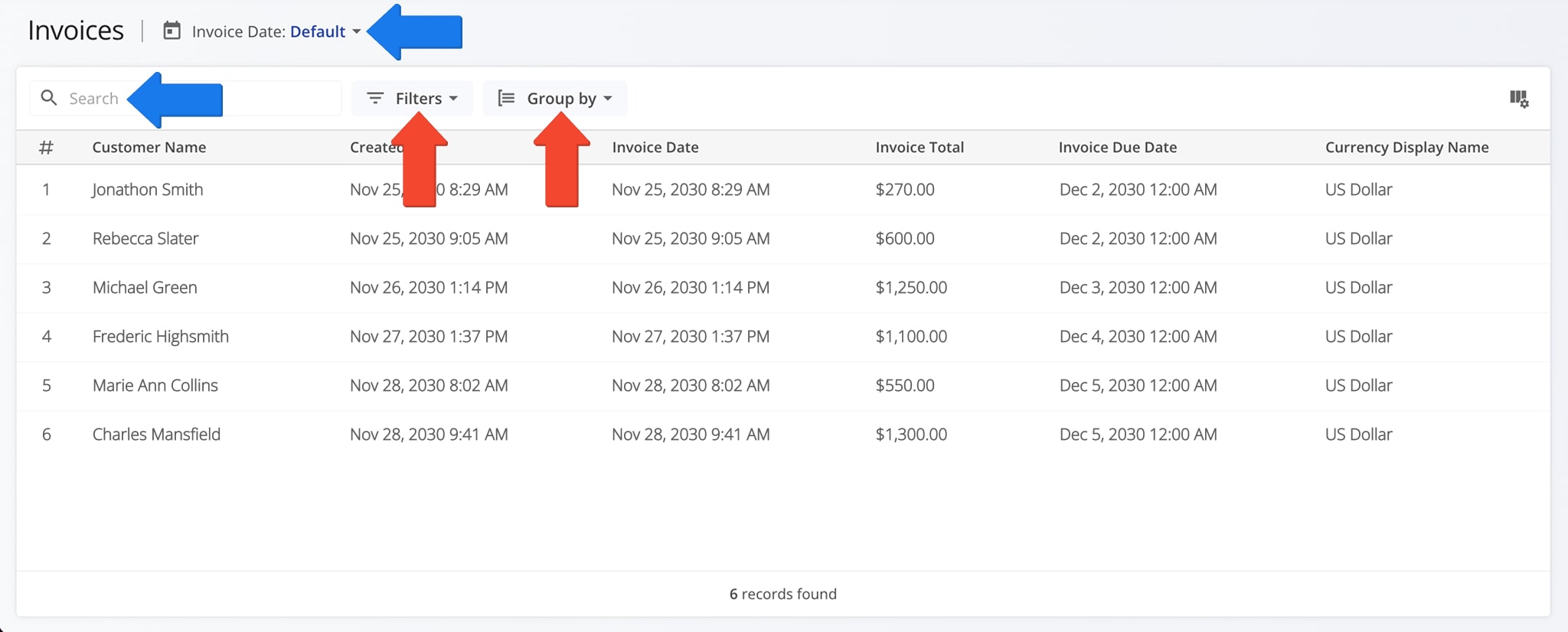
You can filter and group invoice data to quickly find specific invoices or organize records for analysis. These tools ensure accurate financial review and streamlined invoice management. The table below provides an overview of all filter and grouping options.
NOTE: You can also use the Search Field to locate specific Invoice data or search by Invoice date.
| Parameter | Description | |
|---|---|---|
| Filter Options | ||
| Exchange Rate vs. Primary | Filter invoices based on the currency exchange rate used. | |
| Invoice Total | Filter invoices by total billed amount. | |
| Discount | Show invoices with or without discounts applied. | |
| Discount Basis Type | Filter invoices by the method used to calculate discounts. | |
| Payable Terms Days | Filter invoices based on the number of days between invoice creation and due date. | |
| Status | Filter invoices by current status (e.g., Draft, Approved, Sent). | |
| External System Originated | Show only invoices created in an external system. | |
| Customer | Filter invoices by customer name. | |
| Currency | Filter invoices based on the invoice currency. | |
| Group By Options | ||
| Customer | Group invoices by customer to see all invoices associated with each account. | |
| None | Display invoices without grouping, showing all records in a single list. | |
View And Customize Invoice Columns – Manage Data Fields
The Invoices page displays multiple Invoice data columns, customizable to show just the information relevant to your needs.
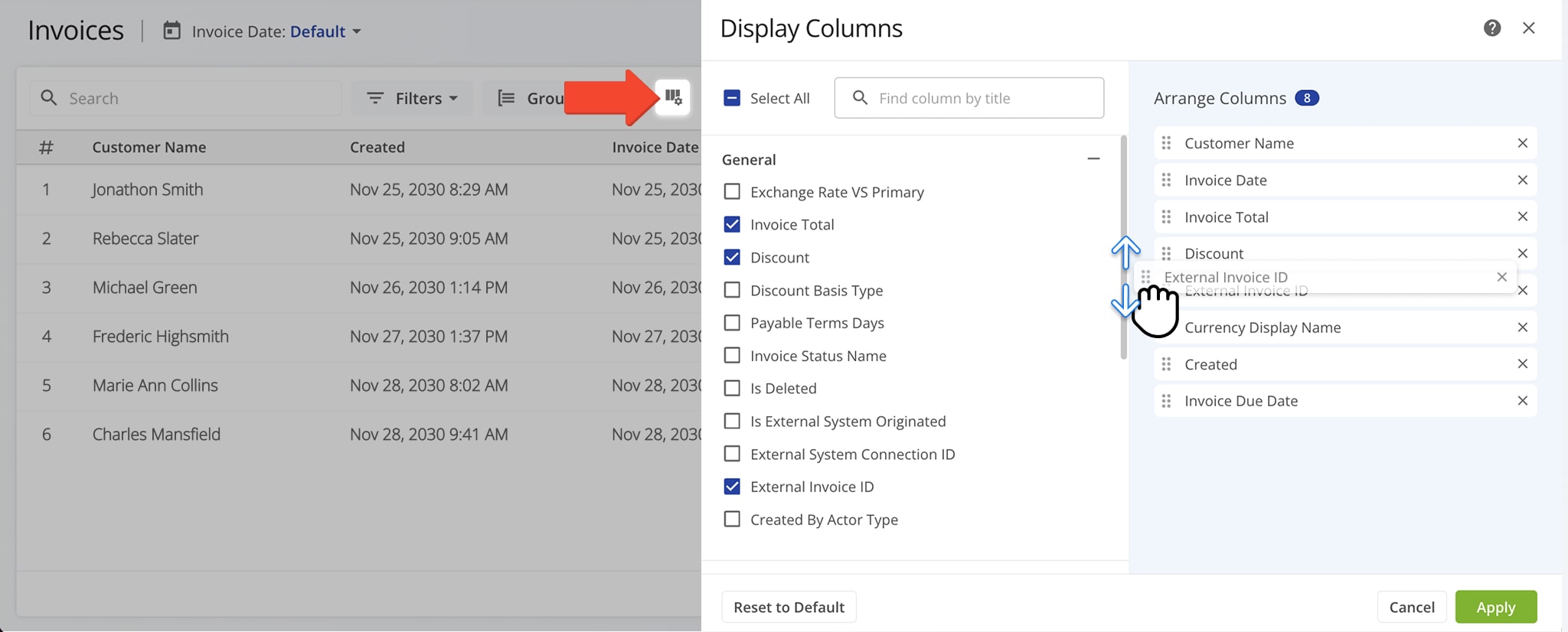
To customize the data that appears on your page, click the Column Icon. Then, check the boxes next to the columns you wish to see. You can also sequence the order in which columns appear by dragging them up or down the “Arrange Columns” list.
The table below provides a complete overview of available data columns.
| Column Name | Description | |
|---|---|---|
| General | ||
| Exchange Rate vs. Primary | Shows the exchange rate used compared to your primary currency. | |
| Invoice Total | The total amount billed on the invoice. | |
| Discount | Any discount applied to the invoice. | |
| Discount Basis Type | How the discount was calculated (percentage or fixed amount). | |
| Payable Terms Days | Number of days between the invoice date and the due date. | |
| Invoice Status Name | Current status of the invoice (e.g., Draft, Approved, Sent). | |
| Is Deleted | Indicates if the invoice was deleted. | |
| Is External System Originated | Marks invoices created in an external system. | |
| External System Connection ID | Identifier for the connection with the external system. | |
| External System Connection Name | The descriptive name of the external system or integration used to create or sync the invoice. | |
| External Invoice ID | Invoice ID in an external system. | |
| Created by Actor Type | Type of user or system that created the invoice. | |
| Customer | ||
| Customer Name | Name of the customer associated with the invoice. | |
| Customer Location | The physical address, city, or site associated with the customer for this invoice. | |
| Customer Reference Number | A unique identifier or reference code assigned by the customer for tracking or reconciliation purposes. | |
| Currency | ||
| Currency Code ISO | ISO code of the invoice currency (e.g., USD). | |
| Currency Display Name | Full name of the invoice currency. | |
| Date | ||
| Invoice Date | Date the invoice was created. | |
| Invoice Due Date | Payment due date. | |
| Created | Timestamp when the invoice record was created. | |
| Updated | Timestamp of the last update to the invoice. | |
| Pricing | ||
| Utilized Pricing Strategy ID | Identifies the pricing strategy applied to the invoice. | |
Visit Route4Me Marketplace to Check Out More Add-Ons:
- Optimization
Address Book and Territories Planning
- Route Optimization
Commercial Vehicle & Truck Routing
- Operations
Audit Logging and Activity Stream

